Wednesday, March 31, 2010

New Book: Holy Bits: A Guide for Using Computers in Biblical Scholarship

Just received a review copy of Thomas Naef's A Guide for Using Computers in Biblical Scholarship. It's from Gorgias Press as part of their Bible in Technology series.
From the publisher's description:
Where on the internet can I find some reliable information about (or even images of) New Testament manuscripts? What should I consider before beginning to type a scholarly article about Pentateuchal Laws and their parallels in the Ancient Near East? You will find in this book answers to these and many other questions. It gathers information and experience in the field of "Biblical Studies and Computer". Some subjects being treated in the book are of a more general interest like hardware and networks, operating systems, textprocessors and others. The main focus however is on concise subjects for biblical scholars like Unicode, biblical software and websites in the field. Each chapter ends up with a list of URLs for further information about the subject. An online up-to-date link list is available.
I hope to have my review up soon...

Friday, March 26, 2010

Logos Search Exercise: A Response

It's time to earn my keep as a contributor here. Life has been busy and has taken some unexpected turns.

MVGH threw down the gauntlet when he posted his article BibleWorks Search Exercise. David Lang responded for Accordance here. Logos users were also issued the challenge but I haven’t seen anyone take it up yet.

Here’s my attempt to "try to find the Greek words used to express a concept in English."

Specifically to answer these questions, What happened to Jesus after he was crucified and buried? He ______ from the dead! What words might you put in that blank? Rose? Was raised? Is risen? What Greek word(s) are behind our English wordings? How will you determine this? There are a number of possible ways to do so...
Although there are a several possible ways to do this, like David Lang I offer the simplest way in Logos 4. (Caveat: I am running the latest beta of 4.0c so your screen may not match, but the steps should work in versions post-4.0a).

0. MVGH suggested using a version tagged with Strong’s numbers. Since Logos offers several Bible versions as “Reverse Interlinears” (currently, KJV, ESV, Lexham, NASB, NKJV, NLT and NRSV) and the goal is to discover Greek words for seminary students studying Greek, I recommend using one of those “Reverse Interlinear” versions.

1. Open a Search window, select Bible search, set preferred “Reverse Interlinear” (NASB to match MGVH) to search and, since we are specifically looking for a Greek word, set search range to New Testament.


2. Since I might put any of “rose”, “was raised”, or “is risen” in the blank of “He ______ from the dead!”, I enter the following terms in the Find box (raised, risen, rose) [133 results in 125 verses]. Separating the terms with commas is the same as using an OR operator to match any terms. Enclosing the search terms in parentheses makes further refinements to the search results easier.


3. Perusing the search results reveals the power and the limitation of the “Match all word forms” option. Results include “raised”, “raise”, “raises”, and “raising” matching “raised” as well as “risen” and “rose”. What is missing are the other forms of “risen” such as, “rise”, “rises”, and “rising”. “Match all word forms” enabled is the default setting, so I assumed above that it was already set. If not, click on the large magnifying glass icon in the top left corner of the search window and ensure that there is a check mark beside the “Match all word forms” option. However smart "Match all word forms" is, it doesn't get all conjugations.

4. To expand the search results to include forms of “rise”, edit the Find box to (raised, risen, rose, rise) [164 results in 156 verses].


Substituting “rise” for “risen” won’t work though, because searching for all word forms of “rise” will not find “risen”. A wildcard could be introduced such as MGVH and David Lang did; however, searching for “ris*” also finds “risked” and “risking”. While these can be filtered by other means such as the “death” term, I would rather not deliberately include false positives only to later filter them out. For example, I found that Philippians 2:30 where “risking” matches “ris*” is not filtered out with the “death” filter.

5. To focus the search results on those instances where “rise” is used in the sense of “resurrection”, I can include “death” and “dead” in the search terms by editing the Find box to (raised, risen, rose, rise) (dead, death). [132 results in 59 verses]


6. Perusing the search results reveals a few false positives (e.g., Matt. 10:21, Mark 13:12). These could be filtered out by using a WITHIN operator such as David Lang did; however, for me the medicine is too strong. Editing the Find box to (raised, risen, rose, rise) WITHIN 5 WORDS (dead, death) excludes relevant passages such as Acts 2:24, Acts 5:30, Romans 4:24, 1 Corinthians 15:13, 42.

7. To find the Greek word(s) behind our English wordings, select the Analysis search results view. Now the search results can be played with. By dragging the Result column heading to the top, search results are grouped first by the search result. By dragging the Lemma column heading to the top, search results are grouped second by the Greek lemma. Right-clicking on one of the group headings and selecting Summary view reveals that the relevant Greek verbs are ἐγείρω, and ἀνίστημι.


G1453 and G450 for the Strong’s Number crowd!


For those interested in Louw-Nida numbers that column heading can be dragged to the top to summarize the search results in that way, revealing that the relevant L-N number is 23.94, Physiological Process and States – Live, Die.


Wednesday, March 17, 2010

BibleWorks Search Exercise

I am trying to construct some exercises for BibleWorks to help my students get experience answering some typical questions one can use BW to answer. Here is the first of what may be a series... 

In this exercise we will try to find the Greek words used to express a concept in English. We will learn a variety of different ways to get the desired results in BibleWorks. Specifically, we will learn to use:
•    OR and AND searches, nested searches, and search limits
•    The Graphical Search Engine to construct a complicated search
•    The Search Limits Filter to conduct two-stage searches
•    The Verse List Manager to collect verses and then use them to set search limits
•    The Louw-Nida Lexicon to look for English words and their Greek counterparts
While we will be addressing a specific question here, the skills you will learn will be applicable in many other situations.
>Here's the question I'm using in this exercise:

What happened to Jesus after he was crucified and buried? He ______ from the dead! What words might you put in that blank? Rose? Was raised? Is risen? What Greek word(s) are behind our English wordings? How will you determine this? There are a number of possible ways to do so...
How would you go about answering that question? Open or download this PDF to see six ways you can do this in BibleWorks.

BTW, I'd love to think I would have the time to produce a similar guide for Logos and Accordance, but I know it's not going to happen... If someone else wants to pull it together, I would be pleased to post it on this blog or link to your own.


UPDATE: 2010.03.19: David Lang has posted steps for solving this question in Accordance over on the Accordance blog. Especially note that Accordance has a "Details" > "Analysis" option that nicely consolidates the information to make visible the underlying Greek words. Thanks!

Tuesday, February 23, 2010

BibleWorks8 Review

I'm guessing if you read this blog, you are also subscribed to Rubén Gómez' excellent Bible Software Review site. If not, you should check out the thorough review of BibleWorks8 he has just posted there.
(I posted some notes on installing BW8, and you can follow the other information I've provided related to BW8 here.)

Wednesday, February 3, 2010

Bible Software Reviews

I taught a JTerm course last month on "Technological Tools for Biblical Studies." (Go figure...) One of the requirements was to provide a brief review of a couple Bible software resources, either downloadable or online, including programs for mobile devices. Students were to pick from this list I compiled which you may want to check, which I describe thus:
This list of resources reflects free or low-cost Bible study options that might be recommended to persons who may not have original language training or who do not want to invest in the major Bible software programs like Accordance, BibleWorks, or Logos
I set up a course blog where we accumulated all the reviews. Here are direct links to the various reviews:
Thanks to my students for giving me permission to share all their work!

Tuesday, February 2, 2010

Looking ahead in 2010: Biblical Studies and Tech Tools

I started this post about a month ago and never got around to finishing it. A main focus of my prognostications was the potential of mobile devices like netbooks, ebook readers, and the (then still rumored) Apple tablet device. With the announcement of the iPad (I was thinking it would be called an iTablet), I can now appear to have been somewhat prophetic... Now updated, here's what I am thinking is on the horizon in technology as it relates to biblical studies.

I am convinced that we are moving to an available-everywhere Internet and that we are going to be using mobile devices to access it. Smartphones have become the device of choice for many, and their advantage is that they are small and can handle the primary tasks of texting, web surfing, email, and, oh, yeah, making phone calls. Many can also serve as MP3 players, game- and video-playing devices, GPS, etc., and, with the abundance of apps now available, as your biblical studies resource too. Their disadvantage is that they are small. It's not just that web-surfing is limited on such devices because of screen size, but they are physically too small. I hate misdialing numbers or text because the keys are so small. With my oldER person's eyes, I have to beef up the font size, and that just means so much less viewable text on the screen. Compared to my current phone's 1 inch square display, most newer phones do have quite nice displays and larger viewing areas. (E.g., Apple iPhone or Google Nexus One or Droid. For now, I have what I need with my old phone and my old but still trustworthy Dell Axim x51v.) So they are great as portable devices, but not for getting serious work accomplished. Will something like the forthcoming Dell Mini5 be better? (Maybe, but I'm not sure I want to put that thing up to my ear when I use it as a phone.) So, is it necessary to choose between the convenience of portability and the need for greater functionality that a laptop offers? And where do ebook readers and netbooks fit in? I believe there is a place something like the now-announced Apple iPad, but the iPad isn't it. Personally, I'd be more inclined to get a good netbook which can do more than the iPad and cost less. If we are heading toward ebook readers, then I think they are going to need to be able to do more in terms of being good tools for students to highlight and take notes (like this) or for being interactive devices with live updates (like this or this or this). Of course there is all sorts of new technology coming down the line...
So what do I want? I want a phone that can provide access to all my biblical stuff in a pinch (like I can now do with my Dell Axim). It would also be nice to have all those other nice goodies like web access, email, MP3, GPS, ... I can probably do that (for a price! and for data fees!) if I ever upgrade my phone and when my Axim dies. I'm the sort that will be looking for a phone using either Android or Windows Mobile 7. I applaud companies like Olive Tree and Laridian for the work they do on developing Bible resources for the various mobile platforms. Logos is also to be commended for their iPhone app. (And how about something for Android next?) To do more substantial work, however, I think I will still use a real computer with at least the minimum functionality offered by a netbook.
With all that said, I still suspect that Apple's iPad (in its 2nd generation) will generate the cool buzz to make more people look at this form factor. Since it seems to be not much of a deal to move apps from the iPhone/iTouch to the iPad, it will have a lot of momentum going forward.

I'm doing more and more of my personal and seminary work in the cloud. I'm using Live Mesh to keep my home and sem computers synced, in particular, the notes I'm writing in BibleWorks8. I'm using drop.io to back up files, make them accessible from any computer, and share them with students. I'm integrating blogs, nings, Google Docs, wikis, and diigo into my courses as ways of sharing and developing resources. I'm also really liking using Google Wave for doing collaborative work that uses threaded discussions. I use Xmarks to keep my browser bookmarks synced across various machines and have access from any machine. (Weave Sync is another option for Firefox.) I use Zotero to do my bibliographic work, and it also automatically keeps things synced across my computers and is accessible from any machine.
What are the themes here?
  • Collaboration: I'm using social networking tools and sites that allow for multiple authors to do collaborative work. 
  • Resource Availability: I'm still not comfortable having my stuff exist solely on the web. (Google Wave is this way for now, but it is still in beta, and it appears that one will be able to download waves in the future.) What I do really like is the kind of syncing to multiple computers AND online access from any computer allowed by tools like Live Mesh, Xmarks, GoogleDocs, and Zotero. 
In relation to biblical studies, Laridian has one good idea with its way of automatically syncing the desktop version of the program and its notes with the USB drive version you can use in any machine. I also like that the Logos iPhone app (which I've only used it on my daughter's iTouch) allows you to access most of the library you have on your computer.

[BTW, for a list of utility software (most of which is free), I recommend THESE to my students.]

For doing serious original language work, I don't think Accordance, BibleWorks, or Logos can be surpassed. I am impressed, however, with some of the free Bible software that is available (e.g., LaParola or e-Sword) and with some of the online Bible resources sites (e.g., NET Bible, Great Treasures, Biblos, or Bible Web App). Most of these are labors of love and service which generate little or no income. On behalf of all of us who use them, you have our thanks! There are, at least, the kind of resources I can recommend to interested lay persons who don't necessarily want to invest in or are able to make full use of the big commercial programs. (BTW, for a somewhat complete listing of such resources, check HERE.)
As far as the future goes of Accordance, BibleWorks, and Logos, I have no inside information. Looking back and watching how they have progressed, however, it appears that they all have been rather faithful to their roots even as they add features and tools. I hope they all continue to thrive, because not only do they do somewhat different things, but I think the competition is good as a way of encouraging innovations and improvements. One such area is the creation of biblical texts that are syntactically analyzed. Another area where all of them are working is integration with online resources.

Okay, so I haven't really gone out on a limb to make any wild predictions here. I've done better at describing the current state of things and identified some trends. If you want some provocative future predictions, check this timeline. Be sure to check the prediction for 2020. Imagine having, say, an entire biblical library implanted in your brain, always available just for the thinking of it. Are you thinking of it? Are you thinking it is something we really want in our future?

Sunday, January 31, 2010

Bibloi.NET for the Web and Mobile Devices

Received the following notice today:
Silver Mountain Software is happy to announce the release of Bibloi.NET. Bibloi.NET is a web version of the Analytical Greek New Testament and the Analytical Lexicon. The program can display the AGNT as a regular text or as an interlinear text. There are several different translations and versions (Modern Hebrew NT, TR, and several other languages) which can be interleaved with either the plain or interlinear text. More alternate texts are on the way... Works great with the iPhone and other mobile devices!
Check HERE to see a sample of the text.
Many of you may remember Silver Mountain for its Silver Greek and Hebrew fonts and for its Bible Windows program--now known as Bibloi--which was at one time the premiere program for scholarly, original language work in the OT and NT. Bibloi.NET brings some of that to the web in an online and mobile format. Some things to note:
  • It provides access to the Analytical Greek New Testament (AGNT) and Fribergs' Analytical Lexicon. I don't think those are available anywhere else online.
  • As you can see in the graphic above, it provides a true interlinear with the Greek text, analysis, lemma, gloss, and translation. I don't know that there is anything exactly like that on the web.
  • For now at least, there is the drawback that the ASV is the only English translation available, and the only other versions available are Tagalog, Textus Receptus Greek NT, Modern Hebrew, and the Spanish Reina Valera.
  • It costs $49.00 which includes a one time setup fee and a one year subscription to the site.
For comparison, do note what you can do at the NET Bible site, at Biblos, and at the interesting Bible Web App site.

Saturday, January 30, 2010

Biblical Art on the Web - Help?

I received an email message from Rolf Staerk who has done an incredible amount of work locating and organizing Biblical Art on the Web. It's one of the first places I recommend people check when looking for such art. He writes:

I regret to tell you that I have decided to pause my work on the Biblical Art site since, after about 10 years on the Net, I've received an email that puts into question my use of thumbnails.

I have always thought that since displaying thumbnails is ruled fair use of images in court, I am not breaking any law. Now I'm told by a copyright holder that I do. I'm not sure.

I'm seeking advice as to whether or not I may expect legal prosecution from my work, or not. IF YOU KNOW ABOUT A LEGAL EXPERT who may help me as a service in God's Kingdom (I'm not able to pay anyone), please let me know.

I've put approx. 6-8000 hours into this freely, so I feel very sad about the situation. About 1500 people use the service every day.

If I receive help on the above mentioned matter, I may be able to continue as before.

Anyway, the site will probably be up going for months yet, but there will be few updates, if any. I'm sorry.
If anyone knows more about such matters or can provide advice, it would be appreciated. Click on the Contact button on the Biblical Art on the Web home page to let Rolf know.

Thursday, January 14, 2010

glo Bible Review - Part 1


Received my copy of the glo Bible, and I will supply notes as I go about installing and using it.
The software comes attractively packaged, and the packaging itself is fairly eco-friendly. (Ie, not a large package and no plastic.)
Check out the system requirements: WinXP, Vista, of Win7 (no Mac yet, but there is a promise of a Mac version in late 2010); dual core processor; 1GB RAM (XP) or 2 GB RAM (Vista,7); video graphics card (ATI or NVIDIA w/ DirectX 9 support); Internet connection; DVD-ROM drive; and 18 GB free hard disk space. I'm all good for except for that last figure. That's a lot of space, and apparently it can't be run from the (3) DVDs. I'm going to have to clear off some pics and music... Even that won't do for my laptop with its 100Gb total. >> So, I've got an external hard drive at home for my desktop. It's almost 5 years old now (P4 3.00GHz, 3GB RAM, 256MB Nvidia graphics, WinXP SP3)...
Started installation and got an installer error message. Try again, but this time I uncheck the initial installer message that wants to prevent access. Installation first makes sure I have minimum system requirements. OK! Registration goes fine, except that it takes a couple tries to activate and register using the code. It helpfully pops commonly confused characters, but I have to erase everything to make it work. (Ie, I can't just correct the one character.) We're good... Select Install Path, and I set up a location for it on the external hard drive. It's just a USB 2.0 connection, so hopefully it won't slow things down. Now it makes sure I have the latest DirectX. That I don't, so it installs that. Then checks for latest MS SQL Server Compact. That I don't, so it installs that. Tests the Media Player. OK. Now we're ready to install, and the instructions indicate that it may take "1-3 hours (or more)." I'm supposed to close all other programs, but I'm living dangerously and keeping this Firefox window open to record my progress. As it installs, it will display a bunch of tips... Then it looks for and installs updates from the web...Back later...
Well, only 15 minutes later, and it says "Glo is ready to run." I've only inserted the first DVD, so probably more to come...
Program starts right up, and indeed I do get the option to "Explore Glo Now!" or to "Continue installing Glo media" which will take 1-3 hours. I'm going exploring!
Here's the opening screen. These are the "lenses" that provide the overall orientation: Bible, Timeline, Atlas, Topical, Media, and MyGlo.


I've been working with Mark 4.26-29 lately, so I click Bible, and find it very easy to navigate to the book and chapter. There looks to be quite a few ways to navigate to a text with a variety of buttons, but I don't see any direct reference entry option. The text shows up like this:


Nice. Most things work via a drag and move. (If my computer had a touch screen, this would be very easy to navigate.) The scroll wheel will magnify/decrease display when appropriate. Moving the mouse over any section pops up more options: changing text size, navigation buttons, changing from mouse navigation to text selection, popout links back to main menu, page snapshot, search, bookmark the page, etc. I note that I have the NIV translation (the only other option for now is KJV) with NIV Study Notes at the bottom. Clicking on the study notes or photo brings up another page like this with articles, photos, artwork, virtual tours, maps, and interactive documents that are attached to this passage. Articles are from the Zondervan Pictorial Encyclopedia of the Bible. My spot can be saved as a "session" at any time to return to it.
Right clicking on a text brings up more options:


It's another way to move around or to add notes to a verse. (There's also a journal one can write within the program.)
Looks like I will need to take the time to load up the rest of the content to do much more. So I will come back to this later.
First impressions? >>
I read a lot of mixed reports about the program on glo's Amazon page, but, other than the minor glitchy things with installation, I'm not experiencing any problems. My system certainly isn't state of the art, and I am using an external hard drive. (I can understand the desire to get fast access to media by requiring hard drive installation, but still, 18GB is a lot of space...) The text display is fast. The other graphical stuff is not 'fast,' but at a few seconds for the visuals to appear, it's certainly acceptable. While the program won't be confused with a heavy duty Bible software package for original language study, it is a diverting and entertaining way to get around. I suspect that many users will start out with a text and end up wandering around from some interesting aspect to the next. I suspect this is the kind of thing most casual readers are hoping from a Bible software package, so I am (at this point) comfortable recommending it. I'd like other options than the NIV or KJV, but I suspect that was a natural marketing decision based on what Bibles are best sellers today. The 1975 Zondervan Pictorial Encyclopedia of the Bible (which sells for $125) is not my favorite, but it's better than the public domain dictionaries floating around the web or included in other software packages. Selling for about $50, the glo Bible is not that much more than a bound study Bible. You certainly are getting a value when you consider the reference and media materials included in the package.

I'll finish my report later after loading the rest of the media and playing with it a bit more.

Saturday, January 9, 2010

Zondervan Illustrated Bible Backgrounds Commentary... and some technological aspects of publishing


This post is not intended to endorse or denigrate the Zondervan Illustrated Bible Backgrounds Commentary OT series. Rather, I'd like to note a couple 'technological' aspects of this work that reflect the evolution of publishing today.

First, as you would expect, you can buy the collection as a hardcover set. Meanwhile, it's also in development as a digital resource for the Logos/Libronix platform. (I'm not sure whether it will be available for Accordance, but they do have a working relationship with Zondervan also.)

Second, as a way of promoting the series, Zondervan has been publishing excerpts of it on Scribd. The most recent is the release of the commentary on Daniel by Ernest C. Lukas. (This is probably only available for a limited time. You can also check out Zondervan's excerpt from Kostenberger's A Theology of John's Gospel and Letters.) Scribd is an interesting presentation format that allows you either to scroll down through the pages, view it as a book where you turn the pages, or view it as a slideshow a page at a time.

Third, you will note that this background commentary is highly illustrated. And from where did many of those pictures come? (Cf. the Acknowledgments, pages vi-vii.) In addition to ones from publishing sources, some come from the usual suspects that are probably familiar to those who inhabit the web, e.g., Todd Bolen at BiblePlaces or Tim Bulkeley's eBibleTools. The first listed in the acknowledgments are those from ... Wikimedia and Flickr

So, publishing a book today may include getting quality resources like pictures (free, no less!) from the web. It is not simply a matter of getting a hardcover out the door, but it also involves promoting it by sharing digital excerpts and publishing is simultaneously in a digital edition. These things have really only become feasible within the last 10 years.

Wednesday, January 6, 2010

2009 Review of Biblical Studies and Tech Tools


Tech stuff is moving so quickly, but it is helpful to review and get a bit of perspective on what's happened over the past year in the area of biblical studies.
I'm sure I missed something important that happened in 2009, so leave a comment!


On a more personal level, I'm still trying to figure out the future of seminary education (here and here) and, in particular, its relation to technological resources. 
I am also finding that it is very hard work trying to keep up with all the developments as well as simply keeping up with blogging. A move in August kept me from blogging that month, and a publishing commitment kept me from doing anything in December. Even compiling this year end review means I'm procrastinating on another project I need to do... No new year's resolutions in this area, but I am still committed to keeping this thing going. I'll probably have to narrow my focus a bit, but I believe that this kind of blog does provide a worthwhile contribution to the field of biblical studies.
Now, when I get some time, I hope to give some predictions about 2010!

Saturday, November 21, 2009

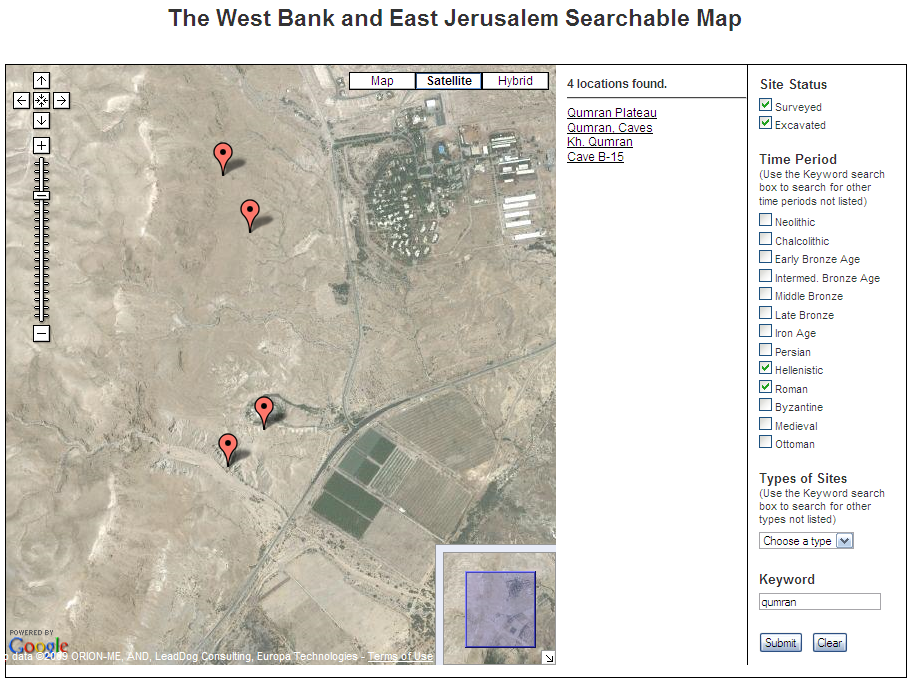
West Bank and East Jerusalem Searchable Map

The map described in the article linked above is quite an achievement. It's worth reading the whole article, but here's how it starts:
A team of archaeologists from UCLA, USC, Israel and Palestinian territories has developed the first map detailing Israeli archaeological activity in the West Bank and Jerusalem – much of it never publicly disclosed.

The fully searchable online map, which serves as a window into thousands of years worth of archaeological sites in the Holy Lands, has won the 2009 Open Archaeology Prize from American Schools of Oriental Research, the main organization for archaeologists working in the Middle East.
Use THIS LINK to get to the page with further description and the links to the two versions of the map you can access, both of which use Google Maps. The first is a searchable map as shown above. You can search by period, type of site, or keyword. The other map, shown below, uses KML and opens directly in Google Maps.
There are over 7000 sites indexed, but note that it is limited to the West Bank and East Jerusalem. As you can see in the view below, that does mean you don't have sites along the cost or in the north.
One thing that is particularly commendable about this project is that is was a joint Israeli and Palestinian effort. In fact, "the USC Web site is part of a larger effort to devise a framework for the disposition of the region’s archaeological treasures in the event of a two-state peace agreement."
Check it out.
[HT: PaleoJudaica]

Thursday, November 19, 2009

Encyclopedia Judaica Online

IMPORTANT UPDATE: It was not clear initially on the site, but it turns out that this online edition of Encyclopedia Judaica is only available for members of the Jewish Community Association of Austin. They have now clarified the language on the site and according to their contract are unable to honor requests for the password for others. If anyone does know of a legally available online edition, let me know! (My apologies to the JCAA for the inconvenience who were gracious about the mistake. I have removed the links.)
I don't seem to have found a link to this on any of the usual sites I frequent, so it perhaps may also be helpful to you to bookmark this link for free access to the complete, 22 volumes worth, $2263 at Amazon set, 2nd edition of 2007, Encyclopedia Judaica. (That's the link to the entrance page for the Jewish Community Association of Austin where you will find the acknowledgement to Sharon and Richard Kammerman for this online edition and the password needed to access the site.)

While this encyclopedia covers the whole spectrum of Jewish experience up to the present, there is still a ton of biblical stuff readers of this blog may be interested in checking out. Peruse the hundreds of maps, a 44 page "Land of Israel: Geographical Survey," a 6 page article on "Mikveh," 18 pages on "Aramaic," 6 pages on "Jesus" by David Flusser, and information on
virtually any location in Israel or the Jewish diaspora (e.g., Capernaum with a diagram of the synagogue or Corinth or Dura-Europos). To see the maps and illustrations in full size, you will want to download the PDF files instead of viewing the HTML page. You can have the page read out loud to you (!), but more helpful are the download and Citation Tools to help you get the bibliographic data you need. This is definitely an outstanding online resource you should have bookmarked.

And while I'm mentioning matters Jewish, it gives me an opportunity to highlight again the LiveScribe Pulse Smartpen. They have now opened an app store as described in this article. A lot of the apps are free or inexpensive, but the most expensive one is the $99 Magic Yad.

The Magic Yad (which gets its name from the Hebrew term for the pointer used to keep one's place in the Torah) consists of Torah and haftarah portions printed on the special dot paper. When an aspiring Hebrew learner clicks on a particular word, they can hear how it is supposed to be chanted. They can also record themselves reading the same part and compare the two.
Hey, take notes on articles from Encyclopedia Judaica using the SmartPen!

Wednesday, November 18, 2009

Bible Mapper 4 Released!

Bible Mapper 4 is now available! This is not only an outstanding program but one of only a few programs that allows for full user customization of biblical maps. Furthermore, David has a heart for ministry, and this program has been a great way for Bible translation teams to produce maps that do not have any copyright restrictions. (BTW, this is a big deal.) Cost for the license key is $37.

Back in April of 2008, I reported that the Bible Mapper 3 program had been withdrawn but was subsequently shared for free but without any support or promise of further development. Bible Mapper 3 is still available for free, but it lacks the improved software and will not have any technical support. Bible Mapper 4 also includes
35 pre-made maps (as map templates) from the Bible Mapper Atlas Collection. It can read BM3 files, but BM4 files cannot be read in BM3. David also has indicated to me that:

I've also made a number of improvements and bug fixes to the program (including a much faster/smoother Select Object engine). One of the new features is the inclusion of Palestine Grid 1923 coordinates, which are often used in older academic works. You can't input data based on these coordinates, but you can opt to use this coordinate format in the status bar regarding the cursor location.
I am very happy with the improved Select Object tool, and the Palestine Grid coordinates is a feature that only Accordance's Bible Atlas also offers.

With David's blessing, I set up a Bible Mapper wiki for mutual user support. Some video tutorials were posted and a number of maps are shared on the site. Users of BM3 and BM4 are encouraged to join this wiki.

For a survey of digital resources for biblical mapping, see the resources I've assembled here.

Thursday, November 12, 2009

Logos 4 Content Comparison to Logos 3

I've been working through some of the new features of Logos4, and I have pulled together a listing of resources that are new to Logos4 that are pertinent for biblical studies research. I am primarily approaching this as a New Testament scholar interested in original language resources and also English translations. I also have a interest in maps and images related to the biblical texts. I teach at a seminary, and my choices reflect my work and the kind of work I anticipate my students needing to be able to do.

I have recommended to my students to start with the Original Languages library, and, if they can afford it, to get the Gold library. Those are the best packages from a biblical studies perspective. My review is somewhat lengthy, so it is best viewed as this PDF file with links. I have listed new resources for each library and provide my subjective comments on their value.
I also provide some evaluations about upgrading your library from Original Languages > Gold > Platinum > Portfolio.

I do especially want to indicate one easily overlooked improvement that Logos has made. (I've been critical of them in the past on this matter, so I need to give credit now.) Rahlf’s Septuagint with Logos Morphology (2 Vols.) is not listed as a new resource, but this is a very important update. The morphological coding in the Logos3 Rahlf's Septuagint had serious problems that rendered it completely unreliable for exegetical work. Some quick checking indicates that the problems have been corrected with this edition using Logos Morphology. [UPDATE in light of Comments: Note that the following texts are in a separate resource, "Septuagint with Logos Morphology (Alternate Texts)": Joshua (text family A), Judges (text family B), Tobit (text family BA), Susanna (Old Greek text family), Daniel (Old Greek text family ), and Bel (Old Greek text family). I suppose the trick is to make a collection so you can search both the standard and alternate texts at the same time.]

If you just want my bottom line, here it is:


CONCLUSIONS – Getting the Logos3 > Logos4 Crossgrade:
Logos 4 is still getting everything together (cf. Missing Features), and this short analysis has a very limited scope of considering only content from a biblical resources perspective. The $70 minimal crossgrade is going to get you a lot of additional functionality, and that alone may be worth the cost (and it does include iPhone access).

  • If you have the Original Languages library, the minimal crossgrade gets you most of what you want.The only substantial additions are the Reverse Interlinears, and those may or may not be useful to you.
  • If you have the Gold library, you do get quite a few additional, excellent resources that will make the true crossgrade very attractive.
BOTTOM LINE: Go to your account in Logos.com to check what your crossgrade or upgrade prices are and use this listing as a guide for evaluating biblical resources.

Again, here is the PDF file with links.

Revised Common Lectionary for Desktop and Mobile Devices


Many ELCA pastors are accustomed to using the little red book not only for appointments but to check out upcoming texts in the revised common lectionary. As they did last year, AugsburgFortress is making the Revised Common Lectionary texts available for free download for the following platforms. Note that once you get it into Outlook, for example, it will sync up with your WinMobile device or with your Google Calendar. (Click on the graphic to go to the Augsburg Fortress page.)


CPH also offers a similar offering they call the 2010 Pocket Diary. It is basically a public Google Calendar, but they show how to get it into other devices.

Thursday, November 5, 2009

Logos 4 Installation Notes

In response to a comment on the previous post, I can provide some information about the installation needs and process of moving from Logos3 to Logos4.

I was running Logos3 Gold Library on a 4 year old, WinXP laptop with 2Gb RAM and 2.16GHz processor. I have the Gold library and ran the upgrade from 3 to 4. Downloads and indexing took a LONG time, by which I mean leaving it run overnight a couple times. The progress reports indicated quite a few gigabytes of data being downloaded and indexed. I don't have exact figures, but the Logos3 installation took up a little less than 4Gb and now Logos4 takes up about 4.3Gb.

The program runs fine with but occasional response delays of a few seconds. On my machine, it doesn't feel 'fast,' but it is quite acceptable and certainly better than L3. Searching is so much faster than L3 thanks to the new indexing procedure. Since I have installed the latest updates, Logos4 has not frozen once on me.

From my experience, at least, Logos 4 works great on an older WinXP machine.

Monday, November 2, 2009

Logos 4 Released

Logos today announced a major release of its Bible software program, Logos 4. (Check out the video on that link and more info here.) I was able to beta test the product, and I will provide more info when I get more time. Just a few things to note for now:

  • It does have a different look and feel. The default start page will make you think of a magazine more than of Bible software. Long time Logos users will need to make some adjustments. In general, and especially for newer users, the user interface is clean, intuitive, and logical. The panel and tab layout does work nicely.
  • The program indexes your library, and so searches are faster. In the beta, indexing took a long time to accomplish...
  • There are quite a few new resources. I'm especially interested in the improved resources in the Biblical Places category, and I will provide a fuller report on those later.
  • Your library is also available via WiFi using an iPhone app. (The app is a free download and also works on the iPod Touch.)
  • Logos3 Gold was superseded by a Platinum version, and now you can also get a Portfolio library ("1550 resources worth more than $31,000.00 in print!"). Price before discounts for Portfolio is $4290. For my seminary students (who can get a 30% discount), I'm still recommending the Original Language Library ($416 list) or Gold Library ($1380 list). Be sure to check the comparison chart. To upgrade from Logos3 Gold to Logos4 Gold is $190 before discounts. (I'm guessing that Logos3 OL to Logos4 OL will be about $100.)
  • A number of resources that one previously had to buy separately are now included in some of the libraries. A special effort has been made to include English-Hebrew and English-Greek reverse interlinears. There are also quite a few interesting new "Maps, Photos, and Media" resources included with nearly every library.
Click on the graphic above to get a sense of the layout and look of Logos 4. This a start, but be sure to check the Logos4 page for more info.

Thursday, October 29, 2009

Searching the B-Greek List

The B-Greek list is a tremendous repository for information about biblical Greek. If the info you want isn't there, join the list, post a question, and you are bound to get an informed answer. According to its self-description:

B-GREEK is a mailing list for scholars and students of Biblical Greek. Our main focus is upon understanding the Greek text of the Bible. Discussion topics include scholarly study of the Greek Bible and related Jewish and Christian Greek texts, tools for beginning and advanced students of Biblical Greek such as textbooks, reference works, bibliography and research tools, and linguistic topics such as morphology, lexicography, syntax, and discourse analysis.
BUT there is a big problem... How does one find information on a passage or word or topic that has already been posted without digging through 1000s of posts in the archives which date back to 1992?

There have been some options posted in the past (Mac B-Greek Search Widget, a bookmarklet, and a Firefox Search plugin which no longer seems to work). So, I made up my own Google custom search... but then I discovered this post with the link to THIS PAGE. That's the page you want because it has a "Search Archive" form that works well. I certainly didn't find a quick link to that page on the B-Greek site, so to save you the work I went through, just bookmark THIS PAGE.

A. T. Robertson's A Grammar of New Testament Greek in Light of Historical Research

A.T. Robertson's A Grammar of New Testament Greek in Light of Historical Research (1919 3rd edition) is something of a classic in Greek grammar that remains important still today. Though unaware of the papyrii discoveries that have happened since 1919, Robertson's work is important for his familiarity with classical Greek and Latin and his awareness of the work of 19th century Greek grammarians. He was also able to draw upon some of the early work of such noted grammarians like Blass, Deissmann, Moulton, and Burton.

A Grammar of New Testament Greek in Light of Historical Research
is
included in BibleWorks8 and all the references to examples in the NT are cross-linked. It is similarly included in the "Greek Study Group" of Accordance which is part of Scholar's 8 Standard Level and up. It's an $80 or so addon for Logos.

If you don't have these programs and can go without the crosslinking,
A Grammar of New Testament Greek in Light of Historical Research is available at Archive.org in a variety of formats, but this is the first edition of 1914. A notice on the B-Greek list, however, brings attention to the work of Ted Hildebrandt and Louis Sorenson who have provided very attractive MS Word files of the third edition (doc, docm, and docx) that has Unicode Greek/Hebrew and includes a Table of Contents with internal links. Thanks to them for sharing their work and making this valuable resource available!