Showing posts sorted by relevance for query bahula. Sort by date Show all posts

Wednesday, April 2, 2008

Blog anniversary...

I started this blog a little over a year ago as an experiment. I wasn't too sure about this whole blogging business back then, but I would say that over the course of just a year, blogging has become a commonplace on the web. It's a format that is here to stay. I suspect, however, that just about as many blogs are dying as new ones are being created. It seems to me that the ones that last will fall into one of three categories:

  • Personal blogs mainly functioning as an online diary without any particular audience (or need for a large audience). I've set up a couple such blogs for my family as a way to share pics and stuff with each other.
  • 'Mega' or 'meta' blogs which have developed large readerships and have now obtained the fame/notoriety/momentum (and perhaps financial support) to make it worthwhile for the author(s). These ones often generate a lot of feedback and discussion from readers.
  • 'Niche' blogs, such as this one, which have a small readership but serve a well-focused purpose or topic. It is always rewarding to get comments from readers, but blogs such as this function more as a way to share information than a place to generate discussion.
It is nice to see that traffic to this blog has steadily increased over the course of a year. I'm averaging about 80 visits/day over the past month. There have been 13,534 total visits from 7,599 unique visitors with 26,738 pageviews since the blog started. Most people are coming via the index page (and over a quarter of the traffic is coming straight from Google, but it appears that many are either following links or are simply subscribed), but for those coming to the site via specific searches, the most popular pages have been the ones on Syriac Tools and Resources and the one on Free, Downloadable Hebrew Grammars. I can always anticipate a bump up in visits when I post about Logos software in response to a discussion on the Logos newsgroups. There is also an increase, though not as large, when posting about BibleWorks with links on the BibleWorks forum. (BTW, all these stats are coming from GoogleAnalytics.)
Other interesting (to me) stats:
  • Over 50% of visitors are using Firefox; 43% using IE
  • Only 2% are using dialup
  • For the 78 of you who have visited this site more than 200 times, bless you!
  • Visitors have come from 118 countries/territories. It is a pretty fascinating list. As one would expect, most are from the USA with the UK and Canada trailing. There is a surprisingly large number of visitors from Italy, Spain, Singapore, and the Philippines.
The future of this blog:
As I'm sure other bloggers can testify, maintaining a blog like this takes a lot of time. If you don't post, it will fade away into obscurity. By being such a specific blog, however, it does mean that a number of visitors will come simply with a new post. I don't need a regular, daily audience.
In fact, a big reason for me to maintain this blog is entirely selfish. It has become a way to help me to remember. I am regularly searching this blog to find links to something I recall posting about. Another semi-selfish reason for this blog is that, as a teacher, I am regularly getting asked questions about a topic or how to use software. It has been much easier simply to point to a blog entry.
I've been more active posting on this blog since January when I started my first real sabbatical. Part of my sabbatical plan was specifically to explore the value of blogging as a teaching resource. I had tried course blogs last fall, but they didn't work the greatest, and for next fall, I'm more likely to try a class wiki approach. Simply as a resource, however, I am pleased with how this blog is functioning.
To increase the value of this blog, I am very happy to include co-authors. Thanks to Tim Bahula (working in Trinidad and Tobago!) for adding a couple posts. I've encouraged my students to think about adding posts as well. When I'm back teaching full-time, I know I won't be able to keep as active, so if you have something to share related to the focus of this blog, please let me know.
At some point, I'm hoping to move this blog to a new domain, Scroll and Screen. It is a problem backing up this blog, but it is more work for now trying to move it all and reset it all using WordPress.
So, thanks to all of you have expressed appreciation for this blog either by reading it or sending regards. I'll keep it going as best as I can.
Mark

Thursday, June 8, 2017

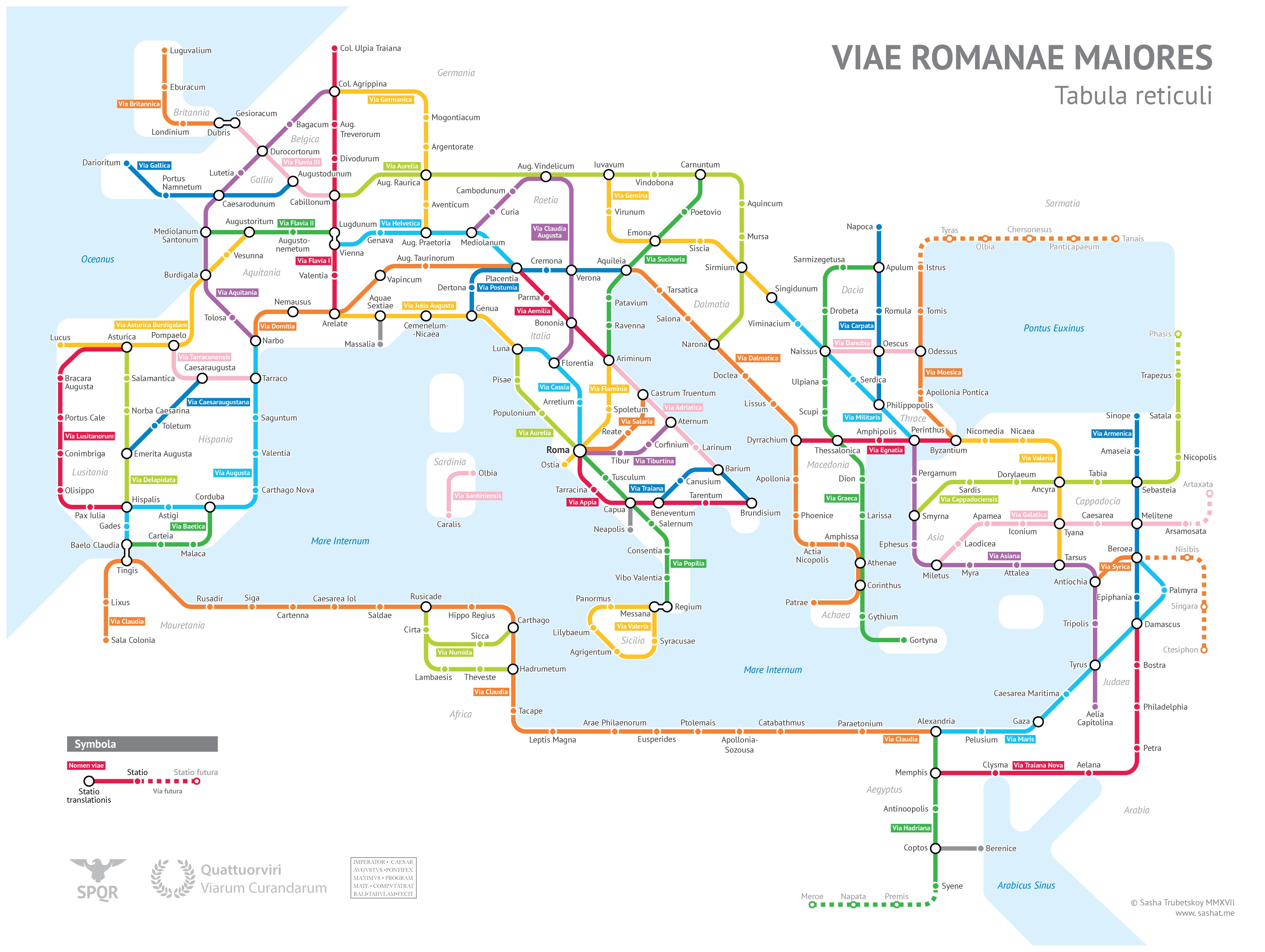
Roman Road system portrayed as a subway map


https://sashamaps.net/docs/maps/roman-roads-original/

Here's a clever representation of the Roman Road system portrayed in the style of a subway map by Sasha Trubetskoy. It's based on the state of the Roman Empire ca. 125 CE, and he notes:
Creating this required far more research than I had expected—there is not a single consistent source that was particularly good for this. Huge shoutout to: Stanford’s ORBIS model, The Pelagios Project, and the Antonine Itinerary.
That's a great use of those online mapping resources! (You will certainly want to check out both the ORBIS for ancient travel planning and the Pelagios site for a very detailed map.) He had to make a number of compromises, and he did not include sea routes, but it still provides a fun and helpful overview. (The map supplied on the site is quite large, but Trubetskoy can send a more detailed version via a Paypal link.)

I'm mindful of the many limitations that a stylized map like this entails, but as a New Testament scholar, I do have a few quibbles.
  • I'm among those who do not think that the Via Maris referred to the Egypt-Damascus route which is better known as the Great Trunk Road. (Cf. the edits I made to the Via Maris entry on Wikipedia under "Name and Controversy.") Trubetskoy does include a note about the naming in her comments.
  • Technically, Jerusalem was not renamed Aelia Capitolina until 135 CE or so by Hadrian.
  • Pergamum sort of appears on the map as a coastal city though it was ~15 miles / 25 km inland.
  • I believe that Antigonia / Alexandria Troas was an important seaport worth including.
  • I think "Via Cappadociensis" is one of the names he created. At least part of it is what was the ancient Persian Royal Road.
  • No room on the map for Neapolis or Philippi...
  • Thessalonica is displayed quite far inland rather than as a port city.
Again, those are minor quibbles considering the format and limitations of what he intended to accomplish. Quite a fun rendering worth checking out!

HT: Tim Bahula who HTs Open Culture

Monday, November 24, 2008

Logos: Searching for Long Sentences

A guest post by Tim Bahula, ardent Logos user


The Bible software showdown continues! When I read Rod Decker's article on finding complex sentences in Mark using Accordance, a spark was kindled. But not having a particular interest in complex sentences, in Mark, or in Accordance, it faded. When I read MVGH's article on doing the same search in Bibleworks, I knew that I need to try my hand at it in Logos.

Even though I've heard rave reviews about using Bibleworks for biblical research, my only experience with it was just after I completed my M.Div. in 1992. At the time I was a poor struggling graduate and couldn't justify the expense of Bible study software. When I had money a few years later, I purchased Logos Bible software and have since made a significant investment in adding library resources. So I want to make it work.

My search approach was spawned by a comment made by Mike on MVGH's entry. He suggested,
"I do think it could be done with a graphical query though, since Logos also allows crossing verse boundaries."

My method was to use a graphical query to find any two words in the same sentence separated by 50 or more words. This search is easy and fast to set up, it runs fast, and it produces accurate results that are easy to interpret and screen.

If you just want the results, the search returns Mark 2:25-26; 3:7-8; 4:31-32; 5:2-4; 5:25-27; 6:7-9; 7:2-5a; 10:29b-30; 10:32b-34; 13:14-16.

If you want to run it for yourself, you can download the graphical query here. You'll need these parameters in the search dialog:


Here are the steps to follow.
  1. Open the Gramcord NA 27
  2. Start a graphical query using from the menu: File > New > Graphical Query - Provide the name you want and hit OK
  3. Drag a TERM object into the search window
  4. When the dialog opens, select Language = Greek, Term = * > OK
  5. Repeat the previous two steps to create a second TERM object identical to the first
  6. Now draw a line from the first (left-most) object to the second (right-most) object (If you haven't drawn lines before, it is a matter of moving your cursor near an object until a gray arrowhead appears and then dragging it to the desired object to be connected)
  7. Double-click on the line just created
  8. In the dialogue, set your proximity to "At least 50 intervening" > OK
  9. Click on the Search icon at the top left > When the Advanced Search dialogue box opens, make sure you are using Nestle-Aland 27 with Gramcord; select to search By: Special and choose Sentence; limit your range to a Bible Text, and type in a single book (in this case, Mark) >> Hit Search
  10. On my older PentiumM, 1.86Ghz with 2Gb RAM WinXP system, the search took about 2 minutes to run
FWIW, after I worked on this method MVGH posted another article with a workable Logos solution developed by Logos' own Vincent Setterholm. It uses the mysterious (to me anyway) "filter object" and the results are less than accessible:
Do not be dismayed if it looks like you only get one hit! Click on "Concordance at the top right of the box, then sort "By reference." The verses listed indicate the end of a sentence just prior to a sentence with 50+ words. (Note Vincent's observation above about 'words' in in the graphical query editor. I.e., there will be some sentences with less than 50 words.)
Now click on one of the references to open up the NA27 text.You will have to scan through the results, but note that there are colored markers to indicate the major stop before a long sentence and a different colored marker at the end of the sentence. (emphasis added)
My method described above avoids all of these problems except for the "word" count problem inherent in Logos. MVGH also highlighted the way that Logos handles the semi-colon, which will affect the results returned.


Saturday, May 31, 2008

Will this be on the test? (Is blogging a worthy academic exercise?)

True confessions here...
I started blogging over a year ago just to figure out what this blogging business was about and whether it had any value for my teaching. As I continued blogging, I found that I have been focusing on a number of areas:

  • Bible software: I've tried to compare the capabilities of some of the programs available, but I am most familiar with Logos (48 entries) and BibleWorks (36 entries). I have tried to identify ways that one might tackle various tasks. I have tried to note significant updates in the field. I have tried to provide something of a survey of online resources as well as those designed for desktop and portable devices.
  • Digital resources for biblical mapping (24+ entries): I got started on this for my classroom presentations, and then I got serious about it for a presentation for BibleTech08. I am continuing to work on this stuff, because I will be doing another presentation on it at the SBL Meeting in Boston in November, 2008.
  • Visualization of data: I think it is important to get the 'big picture' as well as the details. A lot of these entries deal with OpenText.org manipulation of texts.
  • Greek and Greek instruction: Since I regularly teach Greek at my seminary, this has been a particular area of interest for me.
  • Pedagogy: The previous bullet on Greek instruction fits here, but I am also reading a number of education blogs, particularly ones that deal with pedagogy and technology. In a broader sense, many of my entries are ones to which I will be able to refer students, not only to learn about something but to learn how to do or think about something.
  • Research resources: This blog has been a place for me to highlight resources I am using to conduct my work: things like Zotero, library management, and issues related to the use of Unicode fonts needed for biblical studies work.
  • (Multi)media: Another interest of mine is the use of PowerPoint, graphics, photos, animations, video, music, etc. in my classroom presentations. Scan the "Labels" sidebar to see the various ways I've addressed such matters.
  • Syriac Tools and Resources: I really only had one post on this topic, but it was a lengthy one that tried to provide a comprehensive survey. It has turned out to be one of the most read posts.
As you can see from this survey, this blog is not really intended to be a discussion-generating blog, but it has been a neat way to make contacts with a number of others in these fields. I am grateful that Tim Bahula has provided some guest entries. This blog has also provided connections for me with people like Tim Bulkeley at SansBlogue, Todd Bolen at BiblePlaces.com, David Barrett of BibleMapper fame, the remarkable James Tauber (the person behind MorphGNT), Rick Brannan and others at Logos, the BibleWorks wizards Michael Hanel and James Darlack, and many others.

NOW, for the point of this post: As I mentioned in the
anniversary survey post, I have been keeping up this blog as part of my sabbatical work. I have developed an unsustainable lifestyle of posting about 4 times per week, so once I am teaching again, that will have to be cut back.

BUT, does this blog 'count' for real academic work? My seminary has been very supportive of my technological interests, but at the same time, my postings on this blog are not valued in the same way as if I had been busy instead writing articles and publishing books (though I am trying to do that too!). Take a look at this section from our faculty handbook that describes one aspect of how faculty performance will be evaluated.

The following sources and criteria for evaluating a faculty member's professional development shall be used:
  1. Publications and their reviews.
  2. Research and projects in progress
  3. Participation in professional societies.
  4. Appropriate sections of the Annual Report.
  5. External peer review
  6. Evaluation by the members of the Review Committee on such items as:
  • Keeping abreast of developments in his/her discipline.
  • Participation in the work of his/her professional society.
  • Contributions to research by means of publications.
  • Sensitivity to current theological trends.
  • Demonstration of a high level ability to interpret theological issues affecting the life of church and society.
Does this blog constitute acceptable "publication"? Does it count as "research"? Do the interactions with other scholars who read this blog serve as "participation" in the scholarly community? Do the few comments my posts generate function as "peer review"?

I suspect that those of you who are even of the sort to be reading a blog like this (and reading this far into a blog post like this) are fairly sympathetic to my hopes that this blog 'counts' as real research and publication. I don't know what kind of numbers publishers hope to attain when they publish a book or journal, but over the last month or so, this blog is averaging about 100 visits per day and about 2 pageviews per visit. A blog entry may be a rather shallow form of engagement, but that readership seems fairly wide to me.

Bottom line: When I write up my post-sabbatical report, how much emphasis should I place on the work I've put into this blog? What are the rest of you doing when asked to give an account of your work?

Friday, November 9, 2018

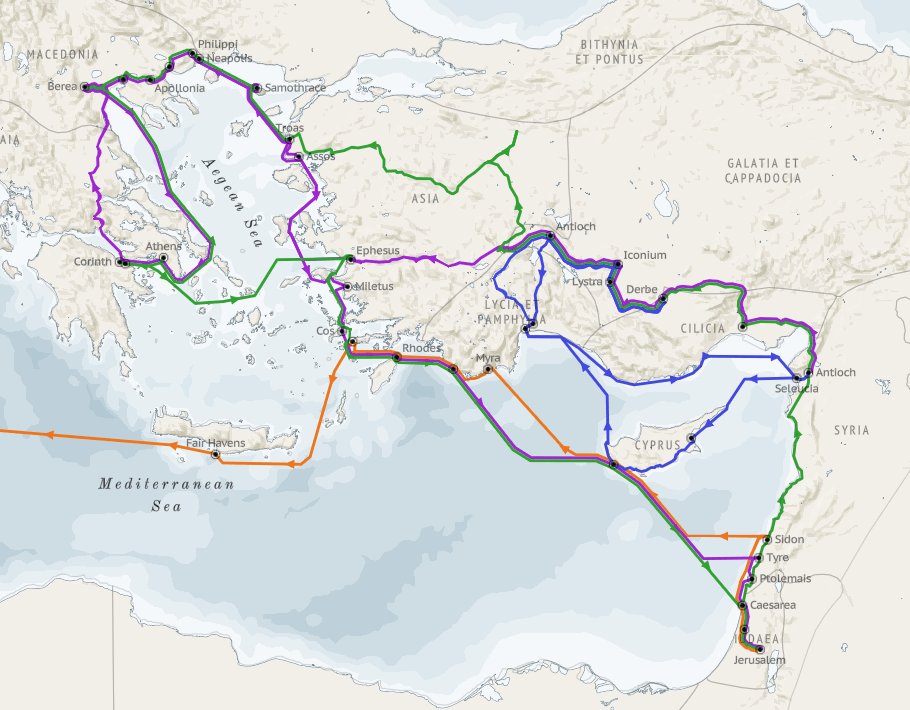
VizBible Map of Paul's Journeys

I just learned about this fabulous mapping project that is shared by Robert Rouse on the VizBible site. It displays Paul's journeys which can be displayed separately, and the but the really wonderful aspect is that the sites on the route are hyperlinked to a popup that indicates on which journey and which Bible text mentions the site. Further, there is a link to the Digital Atlas of the Roman Empire which opens in a new window. From there, you have access to tons of further information from Pleiades, Brill's New Pauly, Princeton Encyclopedia of Classical Sites, more maps, articles, etc. Yes, it becomes a rabbit hole from which you may never emerge, but you'll enjoy the journey! It also works well on a smartphone through a browser with pinching to enlarge/shrink and to select a site.
HERE is the Rouse's blog post describing the work he did in creating the map, and while you're on the VizBible site, be sure to check out the other visualizations he's created.
HT: Tim Bahula on Twitter

Friday, March 14, 2008

Creating a "Graduated" Reader in Logos3

I'm pleased to have Tim Bahula, a missionary in Trinidad & Tobago, as a guest blogger. He figured out a clever way to create a 'graduated' reader in Logos3. Thanks, Tim!

Following BibleTech:2008, I read (and watched) with some interest James Tauber's work on creating a "new kind of graded reader". It caught my attention because I'm teaching first-year Greek for the first time at the Baptist Seminary of the West Indies where I'm Principal. I decided to use the popular Mounce BBG method. But most of the students are struggling,
mainly because they haven't applied themselves, but also because they haven't seen much of a pay off yet. I'm looking for ways to increase that pay off.

When I saw Mark's post about "Creating a 'Graded' Reader in BibleWorks7 (and Logos?)",

I have been searching, but I can't figure out to create a similar sort of highlighted text in Logos. Perhaps one of the Logos experts can show the way...
I knew I needed to try my hand at it. I have heard of the wonders of BW7 from some of my friends and watched as Mark whipped that 'Graded' Reader together. But I am a Logos user, have been for nearly 10 years, and don't own BW7. So I need a made-in-Logos3 solution. I don't consider myself an expert, but have learned some things over the 10 years through experimentation and reading the Logos newsgroups.

I ran into some problems along the way. The process isn't for the easily deterred. It involves a lot of processor time and editing HTML. But the result is similar to what Mark achieved.

These are the basic steps:
  1. Create and export a Vocabulary List.
  2. Edit the HTML file to remove word frequency and gloss data.
  3. Paste the edited Vocabulary List into a Word List.
  4. Create and execute a Graphical Query on the GNT using the Word list as search criteria.
Here is a set of videos illustrating the
process using 1 John for demonstration purposes:
  1. Vocab list creation (2:33, 2.7MB)
  2. Vocab list conversion (1:39, 2.3MB)
  3. Word list creation (1:46, 1.6MB)
  4. Graphical query (2:38, 2.3MB)
Unfortunately in Logos3 there is no way to save the search results or the markup. The search needs to be run again each time.

The process really is kludgy, but it achieves the desired r
esult. If you decide to do this with the entire NT, you will encounter an IE "script warning". Be sure to click "No", as in "don't stop the script!" Clicking "Yes" will lead to undesired results. Clicking nothing will leave the script doing nothing.

Once created the word lists can be used for other interesting purposes. If Mark invites me back, I may explore these in future posts. In the mean time, I've posted the Vocabulary List, Word List and Graphical Query files to my site. If you use them to do something interesting, please let me know. To use them, download and save in the respective "My Documents\Libronix DLS" folders (creating them where necessary... using no spaces).

Using Firefox, right-click and select "Save Link As..."; using IE, right-click and select "Save Target As...":
Thanks, Mark, for the opportunity to share this on your blog. I've been lurking for a long time. It's nice to be able to contribute.

Thursday, March 27, 2008

Logos Syntax Search Apologist: Participle as Object of a Preposition

Thanks to Tim Bahula for contributing this post!
In the Greek Logos newsgroup, Terry Cook asked this question:
While digramming Galatians 5:8 I've come across a construction I haven't seen before: a preposition followed by a participle, i.e., a participle that is the object of a preposition.
Having not encountered this construction previously I attempted to search for its frequency... without success.
Would someone please explain to me how to find this?
I answered by a suggesting a syntax search. Terry wondered,
Is there a short video or some written tutorial instructing the Libronix user on how to determine when to use a "syntax search", a "graphical query", and a "morphological Bible search"?
While I can't hope to answer the question for all cases, I intend in this post to demonstrate why a syntax search is the preferred method for finding a participle as object of a preposition.

Before the advent of syntax searches, a morphological search was the best choice for trying to find this construction. In this first video clip (view it here), I use a morphological search. The "[=P] before 1-2 words [=V??P-???]" search returned 752 occurrences in 365 verses, including Gal. 5:8. But it also returned Gal. 5:6, where the participle is in the nominative case and is not the object of the preposition.

I realized after I recorded the video that the morphological search could be refined to exclude the nominative and vocative case. The "[=P] before 1-2 words [=V??P-?[GDA]?]" search returned 406 occurrences in 197 verses. However, there are still results returned where the participle is not the object of the preposition, such as Gal. 3:23. The problem lies in the proximity constraint. It is simply not possible to open the window wide enough to catch all occurrences without making it so wide that it includes occurrences that don't really fit the criteria.

In the second video clip (view it here) [UPDATE: link fixed], I explore using a graphical query (right-click, "save target/link as..." to download Preposition Participle refined.lbxqyg) to search for the construction. The results are the same. The upside is that the results are returned faster when using a graphical query, the downside is that creating the query is not as intuitive as creating a morphological search.

Finally, the third video clip (view it here) explores using a syntax search (
right-click, "save target/link as..." to download OpenText- participle as object of preposition.lbxstq) to find the construction. The easiest way to create the syntax search is the mimic the structure of the example. The search results include 113 occurrences. I have not verified them... yet. It would be interesting to see if any legitimate results from the morphological search are missed by the syntax search. The downside of the syntax search is that it takes quite a bit longer to return the results... on the other hand, it beats having to weed through false positives.

The syntax search is a great tool to use when searching for words that must be in a certain relationship and there may be intervening words. It seems that the documentation is still weak. Learning to construct the queries takes some practice and the Logos website has some good examples of creating syntax searches.