Showing posts with label PDA. Show all posts

Saturday, January 31, 2009

Research on the go (or Photocopiers are so 20th century)

Most of you have probably already figured this out, but I find I need to remind my students occasionally about some research tools we now have that were not readily available even five years ago. So, let's say you are in the library or a bookstore and you find something you want to remember. The 20th century way would be to get out paper and writing utensil or, if you were in the library, bring the book to a copy machine and make some paper reproductions. What does the true 21st century researcher do? [Check Tommy Keene's (TK) comment to this post.]
If it's short enough:

  • I use my PDA and add it as a note.
  • Send a text message to myself on my cell phone.
If it's a bit longer:
  • Use my PDA and make a voice recording.
  • Send a voice message to myself on my cell phone.
  • Send a voice message to your drop.io box. (Thanks, TK! I've been using drop.io for files, but I was unaware that you can also drop voice mails as well. [drop.io is free, but you do have standard phone charges.])
  • I had really liked using Jott (I'd blogged about it here) because it did voice to text conversion and sent them as text messages or emails. (I really hate trying to type out text messages on my phone...) Jott is dropping their free, basic plan, however. A standard plan will now cost $3.95/month which is not bad at all, but I wasn't using it quite enough to justify it. Do check out Jott Links, though. Using your phone, you could use the voice to text to set appointments for your Google Calendar, add items to your Remember the Milk list, update Twitter or FaceBook, or name some item/book and come home to find a link to that item on Amazon.
If it's a chunk of text or a visual:
  • In our seminary library, we now have a copier that saves files as PDFs and delivers them to my network folder. That's sweet...
  • No PDF copier? Use your cell phone camera or (if, like me, your cell phone is one of those ancient ones that only is a phone) take a digital camera picture. (Now, how do you get the pic from your phone to your PC? Good advice HERE.)
But what if it's really the text and not just a picture of it you want? Open your picture in optical Character Recognition (OCR) software.
  • I have an inexpensive scanner that comes with some basic OCR software. I can open JPG, PNG, TIFF... and it does a pretty good job of getting everything into text. Note that this also works well if you want to convert PDFs which are 'images' and not text. Use a screen capture utility (suggestions here) to take a pic of the PDF, then feed it through the OCR.
  • Don't have a scanner or OCR software. Check the Wikipedia OCR entry, and note the list of software (some of which is free/open source) available.
  • Don't want to bother with dedicated OCR? Want to try full-featured note-taking software? Then remember that Evernote (there is a free version--my review here and another here) and OneNote ($59 for Microsoft OneNote Home and Student 2007 or $80 as part of Microsoft Office Home and Student 2007) have a built-in tool that can identify and extract text from pics.
For biblical studies sorts, however, there is a problem... None of the OCR software (unless you buy very expensive professional stuff) knows how to deal with Greek or Hebrew text. (I do know of HOCR which is free OCR software for Hebrew, but I have not tried it.)

Do you have any research tools suggestions for the 21st century? Help save some paper and share them here!

BTW, as TK points out in the comment, did you see the Zotero icon up in the address bar of this (and any other) blog post? Click on that folder icon to see the Zotero options for saving info.

Sunday, November 23, 2008

2009 'Little Red Book'

A lot of ELCA Lutheran pastors will recognize the little Red Book. If you've gone digital, I just discovered today at the AugsburgFortress display here at SBL that it is now available for both the Palm desktop and for Microsoft Outlook and for any portable device that syncs with Outlook. Click on the graphic to get yours today so you're ready for 2009. Thanks to AugsburgFortress!

Wednesday, July 23, 2008

BibleWorks, Logos, Accordance on your mobile device

The question was recently asked again on one of the Bible software forums whether the Bible software application could be run on a mobile device like a smartphone or such. Short answer: No, you can't really run one of these programs on your WindowsMobile or smartphone as far as I know.
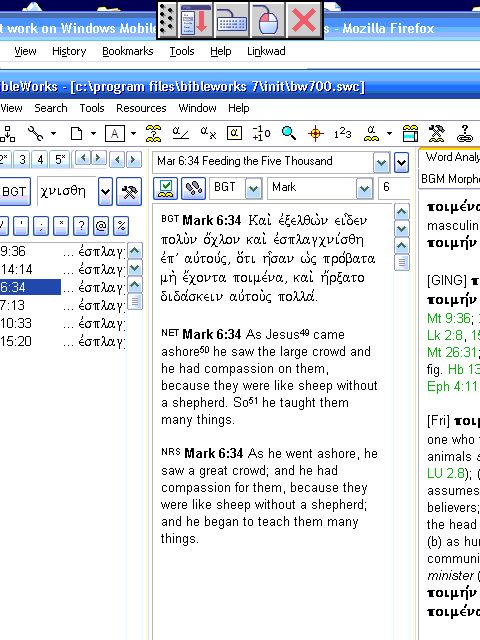
BUT... if you really need it and are willing to put up with a little inconvenience and have good eyes... You can see from the screenshot below that I do indeed have BibleWorks7 on my WindowsMobile device. (In my case, it is a Dell Axim x51v with true VGA display.)

Here is what you need to do:

  1. Go to www.LogMeIn.com or go here directly for the free version.
  2. Download/install the program on your home PC or Mac. Set up account, access codes... (It is indeed free and secure.)
  3. Now, on your WindowsMobile device or smartphone, you need to get on the web, go to the LogMeIn site, and logon.
  4. You will get a display showing which computers are online and on which you have set up the LogMeIn software and provided access. Click on your home computer, supply the access code, and you will now see your home computer screen on your mobile device. You will have complete control over your home computer, but due to screen resolution/sizes, you will probably have to move around the screen quite a bit.
Okay, note a couple things:
  • You don't really have the software on your mobile device. You are simply running your home computer's installation. Hence >>>
  • You do have to leave your home computer running and LogMeIn enabled...
  • It really is quite fast. The only real issue is viewing and moving around the screen, not the speed. (If you want to make it easier, reduce the resolution on your home computer display.)
  • I use this program regularly, but my main use is to control computers for other members of my family. I'm the computer guy in the extended family, and when they have problems... well, it's just a lot easier taking over their computer and fixing things than trying to provide instructions over the phone.
  • I have had absolutely no problems with security or with spam using this program.
Give it a try...

Saturday, May 24, 2008

Berean Bible Study Freeware


From the Berean Bible Study Freeware website:

BerBible is simplified Bible study freeware that includes the complete ESV (English Standard Version ©2001 by Good News and Crossway Publishers) and the NKJV (New King James Version ©1982 from Thomas Nelson, Inc.) Bibles at no cost.
In addition, you can also download for free the NET (without notes), BBE, KJV, WEB, ASV, Webster, and YLT. It is a compact and fast program with installations available for Windows, PocketPC, and Palm. Don't expect any original language tools, dictionaries, maps, parallel version displays, etc. It is only designed to locate biblical texts quickly and conduct efficient searches on those texts, and it does this job well.

Tuesday, April 15, 2008

PDA resources

A posting on the BibleWorks forum brought me attention to the HandHeldClassics site by John Jackson. The site is "dedicated to the development and free distribution of ubiquitous tools for the study of ancient language." In particular, he is interested in the Palm OS and provides suggestions and links for the resources he uses.
I used to use Palm devices, and I know that the Palm OS is still alive on Palm devices like the Tungsten and now on a number of smartphones. I switched over to WindowsMobile when I got my Dell Axim X51v which I really like. Unfortunately, Dell has stopped making this handheld and offers no replacement. It appears that the market is moving everything to smartphones, but I don't know if a phone will be able to do and display everything that I do and display on my Axim. Should my Axim die, I will probably look for one on eBay or switch to this recently released HP iPAQ 210.

Tuesday, April 8, 2008

Pocket Online Bible Review

I have posted a review of the Pocket Online Bible, but it was a bit too involved to post on this blog. HERE is the page where you can read the full review. I will post a shortened summary below.SUMMARY
All in all, Pocket Online Bible is a fine program, and given that it is free, it a good resource. You will want to pay to obtain more Bible versions if you want to make this your primary PDA Bible tool. It really is not intended to be an intensive program for original language study (i.e., it will not replace OliveTree BibleReader as my main PDA program), but there are ways via Strongs to get some idea of the original text. (Original language texts can be added for a fee.) It should most directly be compared with Pocket e-Sword which is also free but offers some important versions for free (e.g. CEV, ESV). The main feature that Pocket Online Bible offers that is not available with Pocket e-Sword is the collection of maps and charts.

Bottom line: If you use Online Bible or e-Sword on your desktop machine, then it makes sense to use the same program on your PDA. e-Sword is the more versatile program, but Pocket Online Bible does include some useful maps and charts.

When I get time, I will provide reviews of the other Bible software I have on my PDA:

Monday, March 10, 2008

Bible on a phone

I still count on my Dell Axim x51v handheld to carry around all my Bible resources, but the newer cell phones make access to the Bible on your phone a reality. David Ker, of Lingamish fame, also runs the lingalinga blog where he has been running a series on this topic. Here is the list he has posted so far:

Continue to check the lingalinga blog for more posts on this topic. Note that the last link is really just using a phone's web browser to view one of the online sites that carries biblical texts. As Ker indicates, it will help to go through a site like Skweezer to view a site on a phone without all the stuff that will complicate the download and viewing. A site I most often use on my PDA is Google Lite (which allows me to eliminate images altogether). Also check Google PDA and Google Mobile.

If your phone is running Windows Mobile or Palm, you can, of course, run one of the Bible programs that were designed for PDAs using these platforms. (Pocket e-Sword for Pocket PCs is a a great choice, and it is free.) The major players for Bible software in the PDA and now cell phone field are Laridian and OliveTree. Both these companies have been working hard at providing support for a wide variety of phones. Laridian (note the graphic below) is particularly notable for providing integration between the various devices you may use. That is, whether you use the Bible software on your desktop, PDA, or cell phone, you can keep all your notes in sync. For now, they provide synchronization between the Windows Desktop, PocketPC, and iPhone/iPod Touch versions of their software.Finally, since I am on this topic, did you see the little "Mobile Version" icon on the right just below the banner near the top of this page? Click on it to 'really' see how this page would look on your phone. I'm using Mofuse to create the mobile version. It is free, and absolutely all the work of conversion is handled without a problem. As they claim, you can convert your web blog into a mobile version in 5 seconds.

Sunday, January 6, 2008

Olive Tree for Mobile Devices: Qumran Texts and Hebrew Bible in Unicode

Olive Tree produces Bible software for a wide variety of Palm or PocketPC PDAs or Smartphones. Their BibleReader program is free, and there are over 100 free downloads of Bibles and other public domain texts. It's a very nice program that they regularly update, and I have been using it through my progression of Palm III to Sony Clie to my current Dell Axim X51v. I have it loaded up with the BHS, Gramcord Greek NT, Vulgate, NRSV, a limited NET, all of Josephus and Philo in English, and some Luther. (Thank goodness for expanded memory cards!) The only thing I'm lacking is the LXX, but I get that free using Pocket e-Sword. But I digress...
This post is to report that Olive Tree recently released a Qumran module using the database compiled by Marty Abegg. (It does not include biblical texts found at Qumran.) The texts are morphologically analyzed, so if you also have the BDB module, tapping on a word will bring up a glossary entry. Drayton Benner has more information on the Olive Tree blog.
Olive Tree also has recently updated their BHS module to employ Unicode fonts. The display is indeed beautiful.

Monday, November 12, 2007

OliveTree updates for PDAs

I have a Dell Axim x51v (now a discontinued product, sad to say...), and I have it well equipped with a number of biblical study resources. I've used OliveTree Bible Software products on my first Palm Pilot (and they provided for me to upgrade the software and texts for my Axim for free) when they were about the only ones that offered the NRSV on a PDA platform. I also have used their BibleReader for my Hebrew MT and my Gramcord Greek NT with UBS dictionary. As with a number of other such PDA products, the BibleReader is free along with quite a long list of free downloads. Most of them are public domain texts, but there are numerous Bibles (including the NET Bible with some notes, the Vulgate, and some early Greek texts) and other books. They do have occasional posts on their blog, and some recent entries indicate that they are moving to Unicode for the Hebrew MT. Also of note, Josephus and Philo in English are now available as free downloads.

Thursday, August 30, 2007

Some new tools

A couple new items:

  • On the OliveTreeBlog, makers of Bible software for Palm and PPC, they are announcing that they are in beta of converting to Unicode. The Hebrew is first, and it looks great.
  • Brandon Wason on the Novum Testamentum blog wrote about a new website called GreekBibleStudy.org. He didn't notice, but buried in the "Translate" section, it does indicate that the base Greek NT is Tischendorf's. I think it is a fascinating experiment in terms of its color-coding, its 'graduated' display linked to Mounce, its "Translate" page which would probably be quite helpful to beginners working on translating, its ability to link notes to one's translation, the easy way to print to PDF pages, and the capability to "Share" and form private or public study groups. Zhubert's site certainly has quite a few more options and tools, but this GreekBibleStudy.org appears helpful for beginners.

Monday, August 13, 2007

Biblical Language Tools on a PDA

There are a number of resources for doing biblical work on a PDA.

  • e-Sword (for Windows) also has a nice Pocket e-Sword version. The program is free, and you can buy such Bible versions as HCSB, Message, NASB, NKJV, and NLT, but you can also get such free versions as ASV, CEV, ESV, Good News, KJV, and more. You can also get a Greek NT, the LXX (free!), and the Vulgate as well as many other language versions. There are also commentaries and dictionaries to buy or for free.
  • In addition to Pocket e-Sword, I also use OliveTree BibleReader software on my Windows Mobile device. (A Dell Axim x51v, now sadly no longer in production.) The software is free, and it is available for a wide variety of devices including WinMobile, Palm, and phones. There is a wide selection of Bibles in original, English, and over 80 foreign languages. OliveTree has been very good about updating the software, and I started using it, because for a long time they were the only one to offer the NRSV. They do have free Greek NTs, but I bought and like the GRAMCORD Lite Greek NT. I also bought the Hebrew Masoretic text, and both the Greek and Hebrew are well implemented. BibleReader has become a platform for an incredible number of Bible study tools: dictionaries, handbooks, lexicons, commentaries, atlases, and other books. Be sure to check out the discounts for buying collections.
  • Laridian and their PocketBible3 is another major player in this market and offers software and Bibles for a similarly wide variety of portable platforms. I have not used it, but it is similar to OliveTree in its kind of offerings.
  • In a post on the BibleWorks Forum, I suggest another way of getting Bible software on a PDA. I really like using LogMeIn for a number of reasons (especially for remote control to troubleshoot problems on computers for others in my extended family), but it actually does allow me to run BibleWorks or Logos right on my PDA.
  • The post mentioned in the previous bullet also generated a link to the free PocketScholar for Windows Mobile devices. (There is also an inexpensive "MiniFlash for PalmOS Devices.") It is basically a Greek/Hebrew vocabulary building program, but it works well.