Showing posts with label openbible. Show all posts

Sunday, April 9, 2017

Blended Digital Gospel Harmony of Palm Sunday Account at OpenBible.info

Blog article link
Stephen Smith at OpenBible.info has posted an interesting proof of concept tool showing what a blended digital gospel harmony might look like. As he notes, gospel harmonies have appeared in print either as parallel accounts (think Aland's Synopsis or Throckmorton's Gospel Parallels) or as blended harmonies of which Tatian's Diatessaron is the earliest known one.

Smith notes the limitations of print harmonies and has produced a digital one that is interactive and gives readers greater clarity regarding where material is being derived. It also lets readers choose to prioritize one gospel if they choose.

In his initial work, Smith shows what the Palm Sunday / Entry into Jerusalem text might look like. The reader has the option of picking one of the four Gospels as the base which is highlighted in red. He notes that it was surprisingly time-consuming to construct a single passage like this, so don't expect a full Gospel any time soon.

I think the most helpful thing about such a tool is that a person can more quickly compare two Gospels and simply note what turns to red or black. One can quickly see that differences, at least in this account, are minimal between Matthew, Mark, and Luke, but switching to John as the base makes a considerable difference.

HERE is the blog article and HERE is a page where you can play with the blended digital Gospel harmony yourself.

Thursday, March 6, 2014

Hacking the Bible

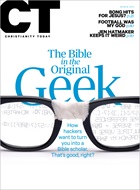
This just popped up in my Feedly... "Hacking the Bible: Inside the world of the new Bible coders—and how they will change the way you think about Scripture" You can read it online at Christianity Today. It's a really lively and fine article by Ted Olsen, a managing editor at CT.

Steve Smith, whose amazing work I've admired at OpenBible.info, is featured. They talk about the "Franken-Bible" project which I previously blogged about. There's a bunch of good stuff on Logos that's fun reading. I like Logos' Eli Evans' comment about what Bible tech is enabling: ""What we're doing here makes it very easy to run with theological scissors." I also think Logos' CEO Bob Pritchett is right when he talks about what technology enables. He says, "I like to follow rabbit trails. But I want curated rabbit trails. I want to be taken to places I'd never go to." I agree that hyperlinking is indeed an invitation to follow an endless array of rabbit trails. It's usually pretty fun, but it often leads to dead ends and is only occasionally helpful. So, yes, curated rabbit trails are needed, but even there we need to curate the curators.

There are some insightful concerns raised about atomization of the Bible (a 'vertical' reading enabled by Bible tech but one that loses sight of the context of a Scripture passage) and the role of biblical experts from the academy and the democratization of Scripture made possible by the Bible tech available at everyone's fingertips.

Ah, just read the article!

BTW, the article describes and links to Vincent Setterholm's (also at Logos) The Toracle: Oxen Law. That's a rabbit trail worth checking out for a bit!

HT: OpenBible.Info

Saturday, March 16, 2013

How to Train Your Franken-Bible by Stephen Smith

That title ought to get your interest, and it is the title of a talk that Stephen Smith gave at the BibleTech 2013 conference. Smith has been doing all sorts of interesting and very helpful work on his OpenBible.info site. (It is worth your time to check that site, especially the Bible Geocoding resource.) He has posted an outline of his talk on his blog HERE. It's rather lengthy, but it includes both his slides and speaking points, and you can scan through it fairly quickly.

He discusses the disruption that ebooks have caused in the publishing world and looks ahead to see what implications this has for Bible translations. Quoting the BibleTech 2013 conference description:
This talk explores the viability of using machine learning and other math-filled buzzwords to computationally derive an English translation of the Bible. While automated processes often produce nonsensical or uncanny-valley-style translations that are just wrong enough to be unnerving, do we have enough linguistic and semantic Bible data to produce a reasonable-quality automated translation of the Bible? And if so, what could such a translation and process look like?
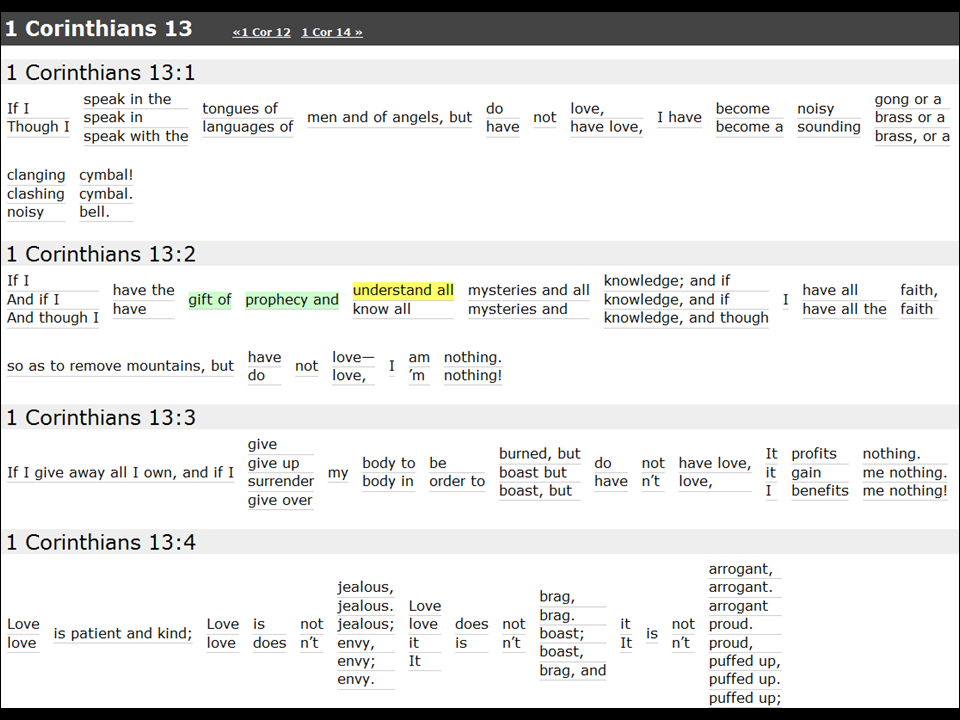
Using readily available technologies such as WordNet, Smith shows what something like this might look like at his Adaptive Bible website. As you can see in the slide below, for users, it's a matter of clicking through on various options of words/phrases in a verse that have been collected from a variety of English versions. (Choices made are in green. Probable next options in yellow.)

Smith is well aware of the dangers of such an approach to Bible translation. As he concludes:
  • What I’ve just described is one pretty basic approach to what I think is inevitable: the explosion of translations into Franken-Bibles as technology gets better. In the future, we won’t be talking about particular translations anymore but rather about trust networks.
  • To be clear, I’m not saying that I think this development is a particularly great one for the church, and it’s definitely not good for existing Bible translations. But I do think it’s only a matter of time until Franken-Bibles arrive. At first they’ll be unwieldy and ridiculously bad, but over time they’ll adapt, improve, and will need to be taken seriously.
I'll add two comments of my own:
  • This approach is a bit different because it starts with English versions, not the Greek original. I suppose this would get one closer to natural English more quickly, and Smith did note one by-product of what he was doing for creating semantic ranges of a particular Strong's number entry using WordNet.
  • I'm also thinking that machine language translation tools will improve and become specialized so that eventually we will have the capability of translating from Koine (not modern) Greek into English. I also imagine that you would be able to create that translation and specify parameters regarding how literal/dynamic it is and reading level of the generated text.
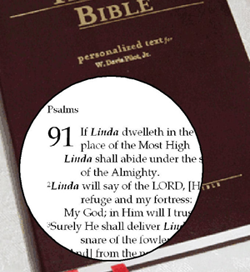
Finally... the marketers are already ahead of the game. Right now, you can get your own Personal Promise Bible! (I'm intentionally not providing the link.) Type in your name, choose a version (for English, I could choose "English Identity for Men"),and a Bible will be printed with your name in place of all relevant pronouns. So, for example, Matthew 5.13f now reads, "Mark is the salt of the earth... Mark is the light of the world." Now you know.

Monday, December 17, 2007

Digital Resources for Biblical Mapping Update

An earlier post requesting comments on what people want in a mapping resource and how they are using it only generated one comment, but it did also generate a couple of fine postings on other blogs.

  • I've expressed my admiration and appreciation for the work being done at OpenBible.info, and the author there posted a comprehensive list of how mapping in Bible software should develop. It is well worth reading, because that person not only has a great perspective on what is possible, but some great ideas about other ways that the maps could be used and integrated with other resources. Thanks!
  • Over on the Accordance Blog, David Lang posted on the benefits of using the Accordance Bible Atlas. It does look to be an excellent resource. I see that Accordance can be run rather well on a PC using a free emulator (instructions/links are posted on their site), but the 3D features of the Atlas are not available. I'll have to do more checking on this. In a more recent post, David also demonstrated a good example of how the mapping software might be used in understanding the battle of Gibeon.
  • Bonus: The latest OpenBible.info blog entry provided a link to a link of work by "The Glue Society" which depicts an imagined Google Earth view of some biblical events: a God's eye view of Adam and Eve in the Garden of Eden, Noah's Ark on Ararat, Parting of the Red Sea (cf. below), and the Crucifixion. Here is the best way to see these fun pics.

Thursday, December 13, 2007

Biblical Places: Locating on a map and in the Bible

As I have been soliciting suggestions for my upcoming BibleTech08 presentation on Digital Resources for Biblical Mapping, one request was made that a person would like to be able to click on a place on a map and see all the instances where it is mentioned in the Bible. Here are some ways to do just that.

  • Using the map module in BibleWorks7, right click on a place name, and then click on that place name in the popup. This causes a search to run in the BW7 main module.
  • Using the OpenBible.info Bible Atlas, one can find the information displayed in the graphic above. If you use GoogleEarth and the OpenBible.info downloadable kmz file which contains all the biblical information, then you can fly around in GoogleEarth, click on a place and get the information displayed like this:
  • There is a similar downloadable file from the GoogleEarth community that provides information from the ISBE or Eastons when you click on a place name instead of the references.
  • A similar online option is to use BibleMap.org. This one works through the biblical text. Clicking on a hyperlinked location name, the place is located on a GoogleMap, and then clicking on that place name will bring open the entry from the ISBE. It looks like this:
There are lots of other ways to get from a place mentioned in a biblical text to an accompanying map, but the best way to find biblical references starting by looking at a map location is the GoogleEarth with the OpenBible file. [The maps in Logos do not really lend themselves to this kind of work. I have created a resource collection of "Maps," and so I conduct searches on that collection to generate the list of appropriate maps.]

OpenBible.info Update: Mapping, Photos, Overlays, Bible Browser, Topical Bible

If you haven't checked out OpenBible.info, it is well worth a visit. I have referenced them before for their work on Bible Geocoding and Bible Atlas and their Bible Word Locator visualizations, but they have other useful resources as well.

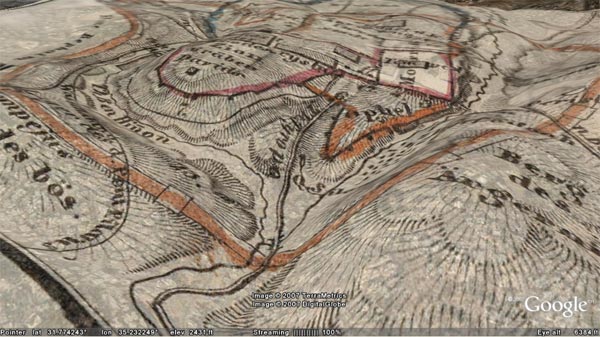
  • Overlays for Google Earth: There is a nice collection of ancient and modern map overlays for Jerusalem, and there is another one for biblical Bodies of Water. These overlays are great in Google Earth, because you can control the transparency as well as adjusting direction and changing perspective.
  • Photos of Bible Places: Using photos from Flickr that people have geocoded, OpenBible has mashed up a list of biblical places with those photos in that spot. It's a mixed bag of results but still useful.
  • Topical Bible is "a web 2.0 topical Bible mashup" that uses the ESV Bible and the Yahoo search resources. If you what to find what the Bible says about a topic, enter a search term, and it will not simply perform a word search, but, by using related words to your search term generated by Yahoo, return a much larger collection of verses. Once these verses appear, however, users have the ability to 'vote' on how helpful they are or not to someone wanting references to this particular topic.
  • Bible Book Browser: This is a neat way to visualize the Bible. There is a picture of the whole Bible, and by moving the cursor over a particular book, you move through the various chapter headings derived from the ESV Bible. Click on the chapter, and you are brought to the ESV text.


Thursday, December 6, 2007

BibleWorks Classroom Tip 1.9 - Maps Module


A new BW7 classroom tip was recently posted on "Using the BW Maps Module." It provides a concise and helpful overview of this module. (Do note that there is another map module in BW7 that uses the NET Bible maps. Resources > Maps > NET Bible Maps.) I'm working on a more complete review of the BW7 map module, but here are some additional, quick observations:

  • It is a very nice mapping program, and it is not too slow. Zooming and panning while using the Satellite Imagery overlay is the slowest. Having used GoogleEarth, I do miss the perspective panning, however. I do also appreciate the ability to use Options > Adjust Color Balance (or click on the red/green/gray icon in menu bar) and work with the colors, including turning it into a grayscale image. It is great to be able to choose between backgrounds: elevation, satellite, land cover.
  • One needs to become familiar working with the Overlays/Stacking Order window. I prefer to keep the window open, but then choose Option > Make this window transparent. Keeps it handy but out of the way. (Cf. my graphic above.)
  • Note that you can find sites within the map module using Edit > Find or by clicking on the binoculars in the menu bar. Also note that if you are reading a text in BW7, right-clicking on a place name will give the option of "Lookup in BibleWorks Maps." Choosing this will open the map module and let one choose the site.
  • Sometime labels seem too big or off the map. I think it must be an issue with zoom and/or chosen overlay.
  • Sites can be chosen related to a particular book of the Bible or event or era. One can use the Overlay window menu to toggle on/off sites, but it is perhaps easier and faster to open one of the predefined maps. (Cf. file selection window on graphic above.)
  • It is very nice to be able to edit maps and create new overlays and/or sites.
  • Note that hovering over a site will give you some information about that site: location, spelling in various versions, etc. Right-clicking on a site will give you its name in some English versions, and clicking on one of those conducts a search returning all the hits back in the base program.
  • The program does not interact with a mouse's scroll wheel (which I usually like to use for zooming).
  • There is no link between a site and the dictionaries in BW7. (You have to right click on site, click on a version to conduct a search, return to the main program, right click on the site name in the text, and select Lookup in Default Bible dictionary. That said, ISBE, Faussett, and Easton are not the greatest of dictionaries.)
  • Another nice feature is the Edit > Copy as vectors/bitmaps feature that allows for defining a rectangular area.
  • The map module does not provide the kind of maps that shows, for example, the general locations of the twelve tribes after the conquest shaded in various colors (but there is a "Division of Canaan" map with labels) or the divided kingdom (but see the "Divided Kingdom" map which does have the regions outlined).
  • One important element I really miss is the lack of any way to display the ancient roads. This is one feature where even the free to use, unregistered version of the Bible Mapper program is really helpful. (I also think that the maps in Bible Mapper are visually more attractive and clearer in their presentation of geographical information.)
All in all, the BW7 maps module is a wonderful feature for the program. I still do recommend getting the GoogleMaps/OpenBible.info addin, however. For more info on mapping options, check my other postings.


Thursday, September 6, 2007

Bible Data Visualizations

A post on the PastorBlog brought to my attention a couple of interesting ways to visualize biblical data.

  • One is the "Bible Word Locator" on the OpenBible.info site, the same people who have done such good work with Bible Geocoding. The Bible Word Locator charts out where specific words occur. You can look up more than one word at a time as my example shows.
  • The other site, Many Eyes, has been around for a while, but I now see that biblical data has been included in their data sets. There are many ways to play around with the data and options for visualizing it, but you can do things like chart relative size of the books of the Bible.
or check out sets already created, like who gets mentioned with whom in the NT. You can adjust parameters so that you can see it as a treemap...
or as a zoomable network map.

Wednesday, April 25, 2007

Of the making of maps there is no end...

By now any of you who have been reading this from the start have become overwhelmed with all the map resources I've pointed out, so, in addition to adding a few more, let me try to organize what I've found. Note that I am focusing on stuff you can get on the Internet (so I'm not really mentioning any hardcopy atlases) and almost all the stuff I'm highlighting is free.

  • Maps for use in Logos, BibleWorks7, and Accordance:
    Each of these programs comes with collections of maps, but there are addin maps you can you use to enhance them.

    • Go to this post to obtain an addin using data from OpenBible.info to download a Bible Geocoding addin for BibleWorks.
    • Go to this post to obtain addins from Nelson Ministry Services and the Access Foundation for Logos.
    • [UPDATE 2007.09.04] Accordance offers a Bible Atlas CD for $89 that includes their Bible Atlas program. Here is a helpful article detailing the use of the program.
  • Programs or websites that feature maps or mapping:
    These are computer programs that feature mapping

    • GoogleEarth: This remarkable program has generated interest in creating a variety of Biblical mapping mashups. This post shows you how to get started with GoogleEarth and how to create your own locations and do geocoding of pictures.
    • In this post which you should check out first after getting GoogleEarth on your computer, I show you how to get biblically oriented overlays and collections of links to use with GoogleEarth. In this post, I show you how to make your own overlays using maps.
    • Interactive Satellite Map of the Holy Land: It is kind of like using GoogleEarth with biblical sites overlays. Like GoogleEarth it is free and uses excellent satellite maps, but unlike GoogleEarth: a) it is downloadable, so you don't need to be online to use it; b) it runs in a browser window; c) it is dedicated to biblical sites and has a very nice interface to quickly locate sites; and d) you can also download a version that can be used on a PocketPC.
    • (Update 2007.07.19) Speaking of PocketPC (and also PalmOS), Olive Tree offers a Bible Map Atlas for $21.
    • I can recommend HolyLand 3-D which comes with the HolyLand Satellite Atlas Volume 1 for $70. This program allows for some fascinating flyovers that I really like. Resolution of images and terrain mapping is superior to GoogleEarth, and it is dedicated to biblical sites and includes photos, information, and scripture links.
    • Bible Mapper: As they say, it "is a fully interactive, highly accurate Bible mapping system that helps you quickly and easily create customized maps of the Holy Lands or study a particular period and aspect of Bible history." The free, downloadable version is quite helpful and does a nice job of providing period-specific views including boundaries and roads. (To see ancient roadways, this really provides some of the most helpful maps.) It is possible to click on a location on the map to open up the satellite maps in GoogleMaps. To get high resolution relief maps within the program there is an additional cost of $35.
    • BibleMap.org: This is another application of the GoogleEarth data to biblical sites that is strictly an online site. Basically you start with a biblical text (using ESV or KJV), and for sites mentioned in the text, links are then provided to GoogleMaps. Once the site is pinpointed on the map, clicking on it brings up information from the 1913 ISBE. It works fairly well to accompany the reading of a text, but it isn't designed to find a place apart from the text. One thing that is nice is that by using GoogleMaps, you have the option of choosing Map / Satellite / Hybrid view which can sometimes be helpful. (Program is in beta now.)
  • Biblically oriented programs or sites that include maps
    • In this post, I described the free, downloadable programs e-Sword and the Online Bible which include maps. I also describe the online and downloadable NET and upgraded NeXt Bibles and the fine maps they include.
    • (2007.07.16 update) The Virtual World Project: Focuses on the ancient eastern Mediterranean with resources for Greece, Turkey, Israel, and Jordan. Search by map location, features (e.g., churches, synagogues, temples), or periods (Paleolithic through Crusader). Excellent collection of notes and pictures, including many 360 degree views.
    • (2007.07.17 update) The Geography and the Bible page at Bible-History.com has a large collection of maps. Especially note the Clickable Map of Ancient Israel of the 1st century CE.
    • Stephen Langfur has been putting together an excellent study resource for biblical sites connected with the Near East Tourist Agency. The maps on that page will get you started.
    • Walking in Their Sandals looks to be a great Bible study resource that includes maps and location information and pictures. Cost: $30.
    • iLumina Gold includes the Tyndale Handbook of Bible Charts and Maps along with over 200 interactive charts and maps and 1000 Holyland photos. Cost: ~$65.
  • Standalone maps
    These are links to sites with actual maps. If you don't have one of the programs cited above and just want a particular biblical map, check out these sites. Remember to use them with proper attribution and copyright observations.

    • NT Gateway Listing of Maps: This is Mark Goodacre's extensive list of links to map sites, most of which are simply collections of maps.
    • Bible Maps and Pictures: Another collection of links to online maps.Especially note the site's own Bible Maps with very helpful 'topical' maps (i.e., maps reflecting a particular event, period, or person).
    • (2007.07.17 update) For visual clarity, I really like the 173 maps provided by the Access Foundation. They are all available online on the Bible Maps page of StudyLight.org. They can be viewed in a variety of sizes. (In a previous post, I noted how these maps are available for download and integration within Logos.)
    • (2007.07.17 update) The American Bible Society has some very useful maps on their Interactive Maps page. (I could not get the interactive feature to work very well in IE and not at all using FireFox, but the standard maps work fine.) These are the maps that are part of ABS's The Learning Bible available both as a book or CD. (As noted in a previous post, these maps are also available within the eSword program.)
    • Some links to maps associated with Jerusalem that I did not see on either of the preceding lists are found HERE about 2/3 of the way down the page.
    • Another collection of maps is available at the Jewish Virtual Library HERE.
    • (2007.05.24 update) Just found another collection of maps, mostly from 15th-early 20th century of the Holy Land HERE. (The site is part of the Jewish National and University Library. I found the link on Rick Brannan's Supakoo site.)
    • (2007.07.16 update) Yet another site: Maps of the Middle East - Most are biblically related maps with some comments.

Friday, March 23, 2007

Mapping Biblical Sites - Update

As I noted in my previous post, I've been interested in the ways GoogleEarth can be used to link with biblical sites. Over at OpenBible.info (specifically, go to: HERE), a GoogleEarth file linked to every location in the Bible has been created. It is really a great resource. If you don't want to download/install GoogleEarth (but why wouldn't you?), there are also preview links grouped by biblical books to GoogleMaps online. The only thing that needs more work is that all the Jerusalem sites are given a single coordinate. The Google Maps are of high enough resolution that those locations could be split up. Each location is also linked to its biblical reference, and that reference is a clickable link to the ESV Bible site. So, you have the option of searching either by biblical book or by specific place or by clicking around on the map.

I also want to highlight another GoogleEarth mashup provided by HERE at the GoogleEarth Community board. It provides a similar collection of links to biblical sites, but instead of linking to the biblical references, brief descriptions are provided.

I've also been playing around with GoogleEarth overlays. If you go HERE, you will find some overlays of ancient trade routes I've created.

I encourage you to grab all these links!