Showing posts with label greek. Show all posts

Friday, January 30, 2026

Matthew 5.38-48 (Beatitudes) for RCL Epiphany 8A

Image by ChatGPT

The RCL text for Epiphany 8A is Matthew 5.38-48, part of Jesus' Sermon on the Mount. 

This is my translation which stays close to the Greek but perhaps gives a different tone.

Matthew 5.38-48 mgvhoffman

38 “You’ve heard that it was said,

‘An eye for an eye and a tooth for a tooth.’

39 But I’m telling you not to retaliate against an evil person.

Rather, should anyone slap you on your right cheek,

turn the other to them as well.

40 And as for the one who wants to sue you and take your undergarment?

Give them your outer garment as well.

41 And should anyone force you to go one mile?

Go on with them for two.

42 As for the one asking you for something?

Give it to them.

And the one who wants to borrow from you?

Don’t turn them away.

43 You’ve heard that it was said,

‘Love your neighbor and hate your enemy.’

44 But I’m telling you, love your enemies and pray for the ones persecuting you,

45 so that you become children of your heavenly Father,

because the sun, God causes it to rise on the evil and the good,

and sends rain on the righteous and unrighteous.

46 For if you love those who love you, what reward do you have?

Don’t even the tax collectors do the same?

47 And if you greet only your siblings, what are you doing more than others?

Don’t even the Gentile do the same?

48 So then, as for you, you are to be perfectly whole, just as your heavenly Father is perfectly whole.”

  • For an explanation of my choices, HERE is a guide comparing translations and highlighting grammatical and lexical issues.

Monday, March 8, 2021

John 3.14-21 Translation and Commentary (RCL Fourth Sunday in Lent Year B)

As I did for the previous week's text (John 2.13-22), I composed a document for my students to work through the coming week's text, John 3.14-21. You'll see what I have done is pull together a range of English versions to compare, including my own translation. The commentary is really a set of questions about the text and translation, and I have provided my own responses to my questions. It's this kind of close inspection of the text that has often generated the ideas that help me find the approach to use in my sermon. Let me know if you find something you would like to discuss!

Here is the document with the translations and notes.

Here is my translation of John 3.1-21 to provide context.


Sunday, February 28, 2021

John 2.13-22 Translation and Commentary (RCL Third Sunday in Lent Year B)

For the Greek and Gospels classes I teach, I have developed a way of working with a biblical passage that I have found helpful and that I encourage my students to use. I've been doing this for years, but I decided I might as well share it. 

First, you will note that I work closely with the Greek text, but you don't need to know Greek. Instead, you'll see in the one handout that what I do is line up a variety of English translations from the 'literal' New American Standard Bible to a more 'dynamic, functional' one like the New Living Translation. I also usually include Peterson's The Message paraphrase since he really did work closely with the original Greek. I.e., by looking at the range of English translations, we have a better idea of what issues we should be looking at in the Greek text.

Second, when I use this in class, I usually have students work in groups addressing the questions that I pose to each verse. Some of the questions are Greek grammatical or lexical ones. Some of them draw attention to key words or concepts and encourage further word studies or research to understand what is going on. Some are translation matters which are highlighted by the comparison of English versions.

Third, I sometimes include my own translation in which I try to apply the results of my questions. You will see that my translations are not easily located on the literal > functional continuum. I tend to be closer to the literal end, but more importantly, I try to capture the emphases and distinctive elements of the Greek. The end result is something that ends up oriented to hearing in English what the Greek sounds like to me in terms of emphasis, word order, and syntax. This all reflects my conviction that these texts were originally heard by most people and not silently read to one's self. (This is especially true for the Gospel of Mark--which I regard to be closest to a transcription of an oral performance--and less true for Luke--which turns Mark into a literary work.) 

Included here are links to my guide for the assigned text in the Revised Common Lectionary for the Third Sunday in Lent Year B. (March 7 in 2021) which is John 2.13-22.

If you want to try to do the exegetical work for yourself, HERE is the translation exercise.

If you want to see how I've answered my own questions, HERE is the key to the exercise.

If you just want to see my translation, HERE it is. You'll see that I have visually presented my translation to highlight the sense units and sentence structure. If I were going to perform this text, I would next go through and use color highlighting and bolding to note the themes and words that hold the text together. It's a great aid in memorization.

In any case, the resources are all in DOCX format, so they are easily editable. You are welcome to use them as you wish. (I would ask that if you share them, do keep my name and provide attribution.)

If you find this helpful, let me know, and I'll try to find a way to share these on a regular basis.

Monday, January 27, 2020

Understanding New Testament Greek grammar for Accordance

I am happy to report that my Understanding New Testament Greek grammar has just been released as a module for Accordance. (2020.01.27) You can read my full description on the announcement page.
TLDR: Due to changing seminary requirements, I have needed to teach Greek in a single semester for a few years now. It's impossible to teach anyone to read Greek in that time, so I teach students how to understand Greek grammar, syntax, and lexical possibilities. The only way to do this is to use Bible software. I've developed a visual way of color coding the text that links to the grammar. E.g., you see something in gold (which means an indicative verb), and you look for the gold section in the grammar to see the range of translating indicatives.
I hope you will check it out! For now, it's a quick download into Accordance, and it's on sale!
If you just want to see how the highlighting works without buying the grammar, HERE is the highlight file. After unzipping, put the HLT file in your Accordance Files\Highlights subdirectory, and it will appear as an option in Accordance when you open the Highlighting tool.

Saturday, August 18, 2018

Free Intermediate Biblical Greek Reader: Galatians and Related Texts from Nijay K. Gupta and Jonah M. Sandford

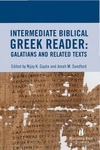
Nijay K. Gupta announced that he is sharing for free an Intermediate Biblical Greek Reader: Galatians and Related Texts co-written with Jonah M. Sandford. Actually, the book is the result of an advanced Greek reading class who used Google Docs to collaborate on the writing of the notes. Read about it HERE. From that page you can find the link to the download which is available as PDF, ePub, or Mobi. The text includes helpful syntactical notes, grammatical/morphological notes, lexical notes, and textual notes. Thanks to Gupta and Sandford for sharing this!

Wednesday, February 7, 2018

Countdown to the Perseus 5.0

Via James Tauber on Twitter, I just found out about the upcoming Perseus 5.0 "Scaife." He's starting a series of blog posts introducing what's ahead. Perseus is already an incredible resource, and I'm eager to see what's in store. From Tauber's initial post:
The Scaife reader builds on the existing Perseus Digital Library, the Open Greek and Latin project and the work of many digital classicists over the years committed to producing openly-licensed material. The code we are developing will, appropriately, also be released under an open source license and an important goal is to build a sustainable community around the code base for the future of philology and historical languages, not just Latin and Greek but well beyond.

Thursday, December 21, 2017

Nine Kinds of Ancient Greek Treebanks


James Tauber retweeted a link to this helpful collection of treebank examples shared by Jonathan Robie. Other than the first one which is from classical Greek, the others are all visual representations of the syntactical structures of Matthew 1.20b. The graphic above is from Accordance, but others are included for the (Logos) Cascadia Syntax Graphs, the Global Bible Initiative Syntax Trees, Lowfat Syntax Trees, OpenText, PROIEL, Syntacticus, and Treedown. Robie also provides some basic information on the syntactical model used by each and how the various schemes are related.
I have not delved deeply into these syntactical treebanks, but I have had occasion to try to use them (I’ve used Logos and OpenText) to search for particular grammatical constructions.

Wednesday, November 22, 2017

MorphGNT, James Tauber, #SBL2017 - Linking Lexical Resources for Biblical Greek

I returned from the annual Society of Biblical Literature meeting in Boston yesterday, and I want to post some of my experiences there. I had some institutional stuff to attend to, so I didn't get to as many sessions as I would have liked, and I didn't even make it all the way through the exhibit hall.
I did make it to James Tauber's session on "Linking Lexical Resources for Biblical Greek" in the SBL Global Education and Research Technology Section. Tauber has done pioneering work on the web, and he and Ulrik Sandborg-Petersen are behind MorphGNT.
In this session, he described the issues behind the schemes, such as Strongs or Goodrick-Kohlenberger, used to tag Greek (or Hebrew) lemmas. There are problems in actually identifying some lemmas and how certain forms are related (ὁράω and εἶδον?). As more resources become available for integrating texts, translations, lexicons, etc., a better system is needed for identifying words and allowing for their use in existing resources.
As the above photo from his presentation shows, someone may identify δέω (#1 meaning either "tie" or "need") as a lemma and δεῖ (the impersonal "it is necessary" = #2) as a separate form. Someone else may want to distinguish the two meanings of δέω, and those could be assigned as #3 and #4 but still be linked in the new system under #1. Further, someone else may choose to include δεῖ #2 under the root #4, so then a new number can be assigned (#5) which links those two.
This way of creating new number assignments as necessary does allow for existing numbering schemes to be preserved and integrated, and it also allows for further granularization and linking as necessary. Clearly there's a lot of work to be done to make this viable, but it does show a way through the categorization issues.
More info HERE.
UPDATE: Tauber has now posted slides/audio of his presentation HERE.

Greenlee's Concise Exegetical Grammar of NT Greek - Free Download


Apparently this may have been around for some time, but I just found it. J. Harold Greenlee's A Concise Exegetical Grammar of NT Greek is available as a free download from Asbury Seminary. It's available as a PDF, ebook, or for Kindle. Recommended!
HT: John Linebarger on the Anglican Biblical and Theological Languages Forum Facebook group.

Wednesday, February 1, 2017

The Brill Dictionary of Ancient Greek - An upgrade to Liddell-Scott-Jones

I'm catching up a bit here, but The Brill Dictionary of Ancient Greek (published late 2015) looks to be an important and critical addition to Greek lexical resources. (To keep this separate from BDAG=the Baer-Danker-Arndt-Gingrich lexicon, I guess we'll have to abbreviate this one to BrillDAG.) I've not looked at it personally yet, but according to Larry Hurtado, this lexicon effectively supercedes the venerable Liddell-Scott-Jones (LSJ) both by going beyond the 2nd century CE to the the 6th century CE and by including more entries from Christian patristic literature. According to the Brill catalog page:
The Brill Dictionary of Ancient Greek is the English translation of Franco Montanari’s Vocabolario della Lingua Greca. With an established reputation as the most important modern dictionary for Ancient Greek, it brings together 140,000 headwords taken from the literature, papyri, inscriptions and other sources of the archaic period up to the 6th Century CE, and occasionally beyond.The Brill Dictionary of Ancient Greek is an invaluable companion for the study of Classics and Ancient Greek, for beginning students and advanced scholars alike. Translated and edited under the auspices of The Center for Hellenic Studies in Washington, DC, The Brill Dictionary of Ancient Greek is based on the completely revised 3rd Italian edition published in 2013 by Loescher Editore, Torino. Features • The principal parts of some 15,000 verbs are listed directly following the entry and its etymology. For each of these forms, the occurrence in the ancient texts has been certified. When found only once, the location is cited. • Nearly all entries include citations from the texts with careful mention of the source. • The dictionary is especially rich in personal names re-checked against the sources for the 3rd Italian edition, and in scientific terms, which have been categorized according to discipline. • Each entry has a clear structure and typography making it easy to navigate.
There is a 28-page preview available, and it certainly is attractively laid out and presented.
A quick survey of some of the entries indicates that there are many more lemmata included as compared to either LSJ or BDAG, but one may still wish to consult those for some citations not included in BrillDAG. Considering that it is from Brill and is 2431 pages long (there is also a 2-volume edition), €99,00 / USD$125.00 seems to be quite a fair price. It's also available as an online resource, but that's going to cost you €1.975,00 / USD $2,590.00 per year!
It will be interesting to see if any of the major Bible software publishers will be able to obtain digital rights to include it within their packages.

Sunday, May 17, 2015

LEXICITY update

lexicity


Identifying itself as "The first and only comprehensive index for ancient language resources on the internet," lexicity is now online in an updated version. (I seem to have missed the first one.) From the site:
Two years ago we launched Lexicity - a site dedicated to providing online study resources for ancient languages. We're happy to announce the second version of our site, which looks cleaner, runs more efficiently, and gets you to the resources faster.
With the second version, we're also committed to continual updates and expansion for language resources. We hope to include other languages soon as well, and we remain focused on creating an online community for learners of ancient languages.
As you can see from the graphic above, there are links to resources for: Akkadian, Arabic, Aramaic, Church Slavonic, Coptic, Egyptian, Elamite, Ethiopic, Etruscan, Gaulish, Georgian, Gothic, Greek, Hebrew, Hittite, Latin, Mayan, Old Chinese, Old English, Old French, Old Frisian, Old High German, Old Irish, Old Norse, Old Persian, Old Turkic, Sanskrit, Sumerian, Syriac, Ugartitic.

Clicking on any of the languages will bring you to a page for subsequent links to Dictionaries, Grammars, Charts & Aids, Texts, and Other Resources.
I did a quick survey of resources connected to Aramaic, Greek, Hebrew, Latin, and Syriac, and I think the site authors have done a great job of locating and linking available material. This is a great place to start if you are looking for resources in this ancient languages.

Tuesday, September 2, 2014

Greek New Testament Vocabulary Lists

In preparation for teaching biblical Greek again this fall, I am once again thinking about the vocabulary I am asking my students to memorize. Since my students will eventually be getting Bible software, the first argument I need to make is why bother memorize any Greek vocab at all. My response is that we need a foundational vocabulary simply to talk about the more significant matters of Greek grammar. Additionally, vocabulary memorization gives me an opportunity to talk about Greek words and their range of meaning and usage. (E.g., what is the distinction between ουρανός in the singular and plural? OR What does ἀμήν mean? What is its Hebrew background? How is treated in the LXX? What is distinctive about John's use of it?) Additionally again, even when we start using Bible software, having a basic vocabulary will make one so much more efficient in the use of the software and even in just knowing which word to put the mouse over!

So, how much vocabulary do we need to know? According to a number of studies, a person needs to know 95% of the words in order to deduce the meaning of the others from the context. (Cf. here and here.) In the Greek New Testament, there are 5400 lexical forms which are used 138,020 times. (BTW, I'm using BibleWorks9's edition of NA27 and the Wordlist Manager for my word statistics. I suspect there are differences depending on the program and text you use.) It doesn't really mean that a person needs to know 5130 (5400 x .95) lexical forms. That's a good thing since there are about 1934 hapax legomenon (i.e., words used only once) in the Greek NT. Rather, a person would want to know about 131,119 (138,020 x .95) words according to their instances in the GNT. This would require a person to know every word that occurs 6 or more times and a bunch of the ones used 5 times in the GNT. That is, one would need to know about 1700 of the 5400 lexical forms. That's way to many for my students to memorize in a semester.

Let's start from the top instead. I like to tell my students that if they know the Greek article along with καί and δέ, they know about 23% of the words in the GNT! Some other stats which provide specifics to the chart at the top of this post.
  • The 10 most common words cover nearly 38% of the GNT
  • The 18 words used 1000 or more times cover over 44% of the GNT.
  • To know 50% of the words in the GNT, you need to know the 27 most common ones.
  • The 37 words used 500 or more times cover over 54% of the GNT.
  • The 100 most common words cover over 66% of the GNT.
  • The 200 most common words cover just about 75% of the GNT.
  • The 311 words use 50 or more times cover almost 80% of the GNT.
There are certainly other factors which could complicate these stats. Most notably, if you know a word root, you can often determine related lexemes. Again, knowing the prepositions and knowing some verbs, the addition of prepositional prefixes is an easy matter.

So what have I decided to do? Given our limited time, given that we are not aiming to speak or write compositions in Greek, and given that we will be using Bible software, I'm going for the 311 words used 50 or more times in the GNT. Students will be asked to learn 30+ words each weeks for 10 weeks. The vocab quizzes will consist of 10 words each and are multiple choice. Students need to get at least 7 of the 10 correct, and they have 3 chances to take the quiz. I'm also going to make life easier for the students by taking the frequency list and sorting it alphabetically. That way, they will have a mix of common and less common words each week.

I've created my own lists of Greek lexical forms ordered either according to frequency or alphabetically. I've added my own glosses which in many cases provide a bit more information than the typical, minimal glosses. If you would like to use these files which are DOCX files you can get them here:
I'd be interested to hear what vocabulary memorization requirements others of you have.

Thursday, July 24, 2014

Playing with Powerpoint, Greek, and Video

http://www.scrollandscreen.com/images/erxomai.pinw.2.mp4
I'm figuring out the best ways to create short (but perhaps up to 20 minute) videos using PowerPoint. I've started using Microsoft's Office Mix, but I'm still practicing with it. It does allow me to record videos with inset webcam video of myself plus narration plus annotations.

Another option in Office 365 (and Office 2013, I believe) is to create a PowerPoint, rehearse the timings and add narrations, then use File > Export and save it as a video. Here is a 54 second one with a little music and some animations. If you know some Greek, you may actually think it's a bit humorous!

Click here or on the graphic above: Ἔρχομαι and πίνω

I've also used programs like Camtasia for screen recordings. It's more work to use this, but the results are a bit more polished. In any case, see what you think, and let me know if you have other ways for producing videos like this. Thanks.

Friday, July 12, 2013

Working with Hebrew, Greek, and English in the MT and LXX - BibleWorks9 (and Logos5)

David Lang is writing about "Using the MT-LXX Parallel" in Accordance. If you use Accordance, you definitely want to check it out.

  • First, Lang shows how Accordance has linked the Hebrew MT and the Greek LXX with English versions so that hovering over a Hebrew or Greek word will highlight the English word. He uses the example in Genesis 1.1 of שָּׁמַיִם and οὐρανὸν. The problem, however, is that though you can see the relationship of Hebrew>English and Greek>English, you cannot see the relationship between the Hebrew and Greek
  • To see the connection between the Hebrew and Greek, Lang shows how to use the "MT-LXX Parallel" tool. (I'm assuming this is Tov's work or one similar to it.) This tool matches up each word in the Hebrew with the word(s) used to translate it (or not!) in the LXX.
  • Since the Hebrew is not tagged in that resource, Lang then shows how to use a MERGE command to handle searches like: "Find every place where the LXX translates the Hebrew word tselem by some form of the word eikon." (This is the word usually translated in Genesis 1.26 with "image.")
Very helpful! Since I am a BibleWorks9 and Logos5 user, I wanted to see how they handle the tasks Lang is describing.

BibleWorks9

As an example, how is שָּׁמַיִם translated in the LXX and English versions? There is no easy way to see this visually in BibleWorks. The closest option I can think of is to find that the Hebrew word is assigned 08064 in Strong's. You could then use the Graphical Search Engine and search for this:

Run the search, and you will see this in the results:

This does let you see both words highlighted, but it only works with the MT and either the KJV or NASB (the only versions with Strong's coding). When hovering the mouse over the Strong's number, you can also see in the Analysis tab the usage statistics. Like Accordance, this kind of matched visual highlighting will not work for Hebrew MT and Greek LXX. So, similarly, BW9 offers Tov's Parallel Hebrew and LXX. (Click on the little icon with the Greek alpha and Hebrew aleph or find it under the Resources in the menu line.) Doing so will give you this:

One thing that should be noted here is that both the Hebrew and Greek are morphologically tagged. This will make it easier to answer Lang's question, "Find every place where the LXX translates the Hebrew word tselem by some form of the word eikon."
There are a number of ways to do this in BibleWorks.

  1. You could use the Graphical Search engine and conduct a search like this:

    In .08 seconds it will generate the 11 hits that match. Hmmm.... Lang came up with 26 or so hits. What's going on? It turns out that Tov's Parallel Hebrew-Greek does not distinguish between the Hebrew and Aramaic parts of the OT, but BibleWorks does separate them. And there a whole bunch of "images" in the Aramaic parts of Daniel! So, yourhttp://www.scrollandscreen.com/biblestudyresources/http://www.scrollandscreen.com/biblestudyresources/ Graphical Search engine query needs to look like this:

    (Note that the percentage sign % following the root indicates Aramaic and the at@ sign indicates Hebrew. If you want the QF file of this search, HERE it is.) Now I get the 30 hits in 23 verses in 0.14 seconds. This is good, but... it's not necessarily what you want. It's actually searching for verses where the Hebrew/Aramaic word appears and the Greek word also appears. It does not necessarily mean that the Greek is translating that particular Hebrew word.
  2. Another way you might answer our question is by using Tov's Parallel again and take advantage of BW's morphological tagging of it. Click on the little binoculars with the א=α above it. When it opens, you can type in the Hebrew root, start the search and you will get this:

    This is a good way to look at all the ways that a Hebrew root is rendered in Greek (or, conversely, how a Greek lemma is rendering the Hebrew), but you also see that the results will need some closer inspection. (You see that the article or conjunctions or prepositions are sometimes listed. This is an issue w/ how Tov categorized things.)
  3. SO, HERE IS THE BEST SOLUTION! Click on the line with the words you are interested in, and then click on the bigger binoculars in Tov, and the Alignment Search Window will appear. Now you can search according to particular Forms or Analysis or Lemmas. For the specific question we were asking, I did a little editing of the fields so that my search looked like this. (Note which boxes I checked.)

    The search takes a bit longer, but it gives exactly the results I want. I can also easily select all my results, send them to the main BW search window, and then generate a list of verses I want: Gen 1:26, 27; 5:3; 9:6; 2Ki 11:18; Psa 39:7; 73:20; Eze 7:20; 16:17; 23:14; Dan 2:31, 31, 34, 35; 3:1, 2, 3, 5, 7, 10, 12, 14, 15, 18.
    Note that this is also the better way to generate all the instances of Hebrew>Greek or Greek<Hebrew. Unfortunately, I don't see any easy way of extracting and synthesizing the results to get the numbers of times a Hebrew word is being translated by particular Greek words.
So, to summarize how BibleWorks does for this kind of work:
  • CONS:
    • There is no visual link of Hebrew, Greek, and English in the normal display mode.
    • There is not easy way to extract a count of how a Hebrew word is rendered by Greek words or a count of what Hebrew words are being translated by a Greek word.
  • PROS:
    • BW offers a number of ways of working with the texts.
    • BW's implementation of Tov's parallel Hebrew and Greek is notable for its morphological tagging which allows for powerful searching capabilities.
    • It's easy to generate lists of verses that match search criteria.
Let me know if I've missed something! In the next post, I will show what Logos is capable of doing.

Thursday, May 9, 2013

Liddell-Scott-Jones (LSJ) in Wiki

We have been fortunate for some time now to have the Liddell, Scott, Jones Ancient Greek Lexicon (LSJ) available on the Perseus site. It has now been rendered as a wiki on the LSJ Ancient Greek - English Dictionary site. Here's what they say:
The Liddell, Scott, Jones Ancient Greek Lexicon (LSJ) is perhaps the best known Ancient Greek-English dictionary. Here you can find a wiki implementation.The wikification of LSJ was no mean task but we hope that the extra features provided by the wiki set-up will enhance the user experience. Some of these features (like the indexes) were made possible through the use of Semantic Mediawiki extensions.
Different types of transliterations and word forms were used, so that everyone is happy: Ancient Greek scholars, speakers of Modern Greek, people who prefer transliterated Greek or Beta Code. For example, you will get results on the search box no matter whether you type in polytonic Greek, monotonic Greek, Greek without any accents at all, or transliterated Greek.
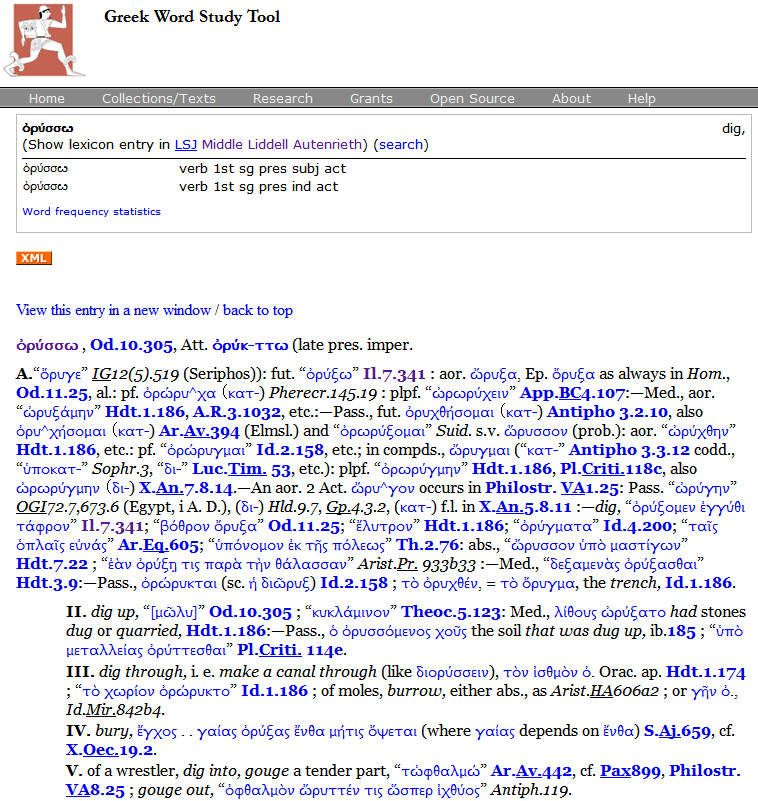
There are advantages to both sites. Below are screen captures (and links to actual pages) for the entry for ὀρύσσω.

The Perseus site can be a bit slow at times, but it does supply links to all the classical texts referenced in a definition.
Click HERE for actual page

The new wiki implementation has more flexibility in typing search terms, returns results more quickly, and displays the English glosses more noticeably. It also allows you to add a search form on your web site or a quick search link on your browser.
Click HERE for actual page

Give it a try, and if you're willing and able, you can apply to help improve the wiki.
[HT: Greek Language and Linguistics]

Friday, September 21, 2012

Greek and Hebrew on Google Drive and Android

 I have been using Google Docs more and more in my classes for students working collaboratively. I also use it for some documents that I want to have available irrespective of what computer I'm using. Google has been transitioning, so now it's all basically part of Google Drive.

One problem in my classroom work, however, is that Google Docs did a lousy job with Greek fonts. I had previously noted that Google had obtained rights to David Perry's great Cardo font, but that it did not include the full font set for Greek. If you used Cardo in MS Word on your local system and then tried to upload it into Google Docs, the Greek was a mess. I'm happy to report that the issue has now been remedied. You may need to do a little extra work to use it in your Google Docs, however. If you don't have Cardo in your Google Docs, here's what you need to do. As you can see in the screen shot below, click on the font drop-down, scroll to the bottom, and click on "Add fonts." This will pop up a screen, and you can search for Cardo and include it in your Google Docs collection. 

All good! Yes! No... As you can see with the graphic at the top of the screen, both Greek and Hebrew look great in Google. Hebrew works right-to-left properly and everything. Greek and Hebrew looks good in both TimesNewRoman and Cardo. You may be wondering why bother with Cardo at all if TimesNewRoman works ok. Depending on a variety of operating system issues, I have simply found Cardo is the best choice, and it includes all the Hebrew, Greek, and text critical characters and more.

Still not all good, however... Google has recently made Google Drive docs editable on your Android and iStuff. Excellent! But here's where the font issue arises again. I can't speak for iPhone/iPad, but on my Android (using a Droid X with 2.3.4), neither TimesNewRoman nor Cardo can display the Greek properly. (Hebrew displays fine, but my Android can't handle right-to-left.) So, what to do? I have just discovered that the Ubuntu font will give you the Greek display that you want as you can see in the graphic at the top.

Great! So now you want to use Ubuntu in documents that you will be sharing on your Google Drive, but... you don't have Ubuntu on your local system. So, here's what you do:
  • Go to the Google Web Fonts page
  • Search for Ubuntu,
  • Click Add to Collection
  • At the bottom of the screen, click on Use
  • On the next screen, click the styles you want to have, then
  • Click on "Download your Collection" (upper right)
  • Go ahead and download, unzip, and install, and you are good to go!
BOTTOM LINE: For docs I'm sharing on Google Drive where I want Greek (and Hebrew) to show up properly I can now use Cardo. If I also want it on my mobile device, use Ubuntu.

Thursday, September 13, 2012

Typing Unicode Greek, Hebrew, and more

 Limited Time Tavultesoft Keyman Special Pricing! Details below

I have posted previously about the various options for typing Greek, Hebrew, Syriac, and other biblical languages using Unicode. Here's an update and a link to a good deal on Keyman...
  • The Tyndale Unicode Font Kit is one good option, but I don't really like the way it requires you to type the Greek accents and breathings before you type the vowel. (The Greek Polytonic keyboard that can be installed through the Windows system is similar.) The Hebrew keyboard is different but reasonable. What's nice about this kit is that it has good documentation with installations for various Windows systems as well as Macs. It also helpfully installs the Cardo Unicode font which is great, free font for biblical studies since it includes a full set of Hebrew, Greek, transliteration, and critical marker characters. For my less tech-savvy students, I just have them use this kit.
  • The keyboards offered by Logos are another good option for Windows users and come with helpful installation and layout guides. Keyboards are available for Greek, Hebrew, Syriac, Coptic, and also a Transliteration keyboard. If you do a lot of transliterating of Greek or Hebrew, that last one is very helpful as a replacement for the standard US keyboard. (There is, however, a minor issue with the Greek Unicode due to its Beta Code background. E.g., to get an eta with a rough breathing, acute accent, and iota subscript, you need to enter the characters exactly in that order to get a proper combined character made of the four different elements. Using Keyman as I describe below, it doesn't matter which order you use after entering the vowel, and the result is the proper and preferred precomposed character.) The Hebrew keyboard is a bit different, but it can be easily learned. If you regularly type in both Hebrew and Syriac, this is probably the best way to go, because the Syriac keyboard matches the Hebrew as much as possible.
  • Logos does offer the wonderful standalone Shibboleth program which is free. (Windows only) It provides a fully graphical way to type Hebrew, Aramaic, Syriac, Arabic, Ethiopic, Greek, Coptic, Ugaritic, Armenian, South Arabian, Transliteration, Hieroglyphs, Akkadian, Hittite, and Old Persian. It's a copy/paste process, but if you only type infrequently in any of these languages, this is your best option. (The same quirk with Greek Unicode occurs as described in the previous bullet, but the graphical interface guides you to enter the elements in the correct order. You still get the combined instead of the precomposed character.)
  • There are web options for typing Greek. You will want to remember at least one of these, because it doesn't matter what operating system you are using, and if you are not at your own machine, you can go to one of these sites to get the proper Greek you need.You simply type and then use copy/paste to get the text into your document.
    • TypeGreek: TypeGreek does not require Beta Code ordering of diacritic entry and returns the proper precomposed character. The only thing I don't like about this site is that to get keyboard help, when you click on the button, it takes you a different page, and you lose everything you have already entered.
    • Greek Inputter: This one does use Beta Code ordering, but it provides good keyboard help just below the input window.
    • KeymanWeb Notepad: This is a great way to gain access to hundreds of left-to-right language keyboards. It is a type/copy/paste option, but you do have a popup keyboard to help.
    • Keyman Bookmarklet: This is your all-language solution, because you can use any of the hundreds of keyboards in Keyman, including right-to-left languages. The bookmarklet is saved as a bookmark with your browser bookmarks. Regardless of the web page you are on, you can click it and type in your chosen language. Popup keyboard help as well. (More info and an example of how you can embed on a personal web page here. HT: Jim Darlack for reminding me of these last 2 options.) 
  •  Tavultesoft Keyman: The reason for trying to get this post up is that there is a great sale on Keyman only good through 19 September 2012. Keyman is for Windows only, but it really is the most elegant way to type in Greek and Hebrew (and a multitude of other languages). I like the Greek keyboard layout, and it properly creates the precomposed characters. You have the option of having an onscreen keyboard popup when you type which is a great help. (Cf. the graphic at top) It has yet another Hebrew layout which is reasonable enough, and you do have the onscreen keyboard help. Installation is a little more involved than I would like (but it perhaps was due to the other keyboards I had already installed). Keyman kind of comes between you and operating system (unlike the Logos keyboards which become part of it), so if you look at your Greek and Hebrew keyboards in your Regional Language settings, they will say that you are using a US (or whatever your default language is) keyboard. Personally, I set up a macro in MS Word which I then assigned to a hotkey so that when I hit Shift-Alt-G, I activate the Greek keyboard and switch to Cardo font. Hitting that hotkey again toggles me back to English and the default fault. There must be hundreds of keyboards available for languages throughout the world. For Greek and Hebrew, I recommend using the Galaxie BibleScript Mnemonic Keyboards. (If you also type in Syriac, your best bet is the basic Syriac Phonetic keyboard, but it does not exactly match the Hebrew. You might be better off looking at the Logos keyboards.) If you do a lot of typing in Hebrew and Greek this is a great solution. BTW, you can download an evaluation version that's good for 30 days. And, until 19 September 2012 you can get Keyman at a great price that is 70% off. The Light version is only $9 (or $14 for 2 licenses - each system needs its own license), and the Professional version is $25 ($40 for 2 licenses). The most important difference between the Light and Professional is that you are limited to only two keyboards in the Light version. USE THIS LINK to get the discount.
BOTTOM LINE: I bought 2 licenses of Keyman (one for home, one for school system). I use Shibboleth for occasional typing in other biblical languages. I use TypeGreek when I'm not working on one of my own systems.