Showing posts with label bible photos. Show all posts

Tuesday, September 15, 2026

BiblePlaces releases new Photo Companion to the Minor Prophets

Todd Bolen at BiblePlaces just released a Photo Companion to the Minor Prophets. Here's the notice:

Today we are excited to announce the completion of 12 new volumes for the Minor Prophets in the Photo Companion to the Bible. This is our largest release in fourteen years and the culmination of a project we began a decade ago.

The Minor Prophets are filled with historical and geographical references, making an illustrated companion especially valuable for bridging the gap between what we see today and the world of the ancient Israelites.

We have details, endorsements, photos, and free downloads below, but here is the short version: today you can purchase all 12 volumes, including 67 PowerPoints and more than 9,000 photos, for the release price of $79 (immediate download or DVD + download).

While you're there, be sure to check out the other outstanding volumes of this photo series. And to keep up to date on all things related to Bible places, be sure to check out the BiblePlaces Blog.

Thursday, December 7, 2023

Now is a good time to sign up for BiblePlaces newsletter!

Todd Bolen's BiblePlaces website has so many great resources. Due to a list manager change, subscribers need to re-enroll for the monthly newsletter. It is worth getting! And anyone who (re-)enrolls now, they will also get two free PowerPoints of Herodium and of Philippi. These are great resources that will give you a good idea of the kind of benefits you can get from the Photo Companions (PowerPoints organized and labelled by book, chapter, and verse) and Pictorial Libraries (organized by sites and topics). You will see that there are thousands of quality photos, maps, and illustrations. Everything is well-labeled with explanations and pointers to biblical passages. You can get further insight into the quality of the work by checking out the resources shared under Chapters (i.e., chapters of the Bible) and Sites. 

Definitely a site worth checking out and bookmarking! Register for the newsletter and get the free PowerPoints HERE.

Wednesday, February 3, 2021

Pergamon Digital Map

https://geoserver.dainst.org/maps/5548/view
Produced by the German Archaeological Institute, this digital map of Pergamon / Pergamum is really fantastic. HERE is the website and the introduction:

The publication of the new archaeological map of Pergamon is an important milestone in the study of the ancient metropolis. For the first time since 1973 a new cartographic basis for the ancient city of Pergamon is available. The new map represents all known archaeological remains.

Viewer has options for details, labels (English, German, Turkish), and backgrounds, all in outstanding detail. Further, clicking on sites provides links out to further resources such as iDAI.gazetteer and the iDAI.objects arachne site which has more information and photos. You can spend a lot of time poking around all that there is to see here.

HT: Mark Wilson on FB


Thursday, September 17, 2020

Oxford Archaeology Image Database online


It's always nice to have access to vetted photos which can be used for free in educational work. The Oxford Archaeology Image Database does just that for sites and artifacts related to Mesopotamia. Use of the photographs is encouraged with proper attribution. A bit about the site:

The OAID was established in June 2015 by Tim Clayden (Wolfson College, Oxford) with support from the Lorne Thyssen Research Fund for Ancient World Topics. Its initial aim was to preserve and make available to as wide an audience and user group as possible images of archaeological sites recorded on slide film. The concern being that as the slide films age and decay the quality of the images deteriorates. In many cases these images are a unique record of the sites at a particular time and once the slide is lost, so too is the image and the information it contains. More recent events in Iraq and Syria have urged a more pressing need to record and preserve the record of some archaeological sites. For that reason the project has expanded to include images in whatever format they are available.

There is a site list, but you can also search for site for features or artifacts from museums. (E.g., Ishtar or ziggurat or jar)

Now you know.

HT: AWOL

Tuesday, June 23, 2020

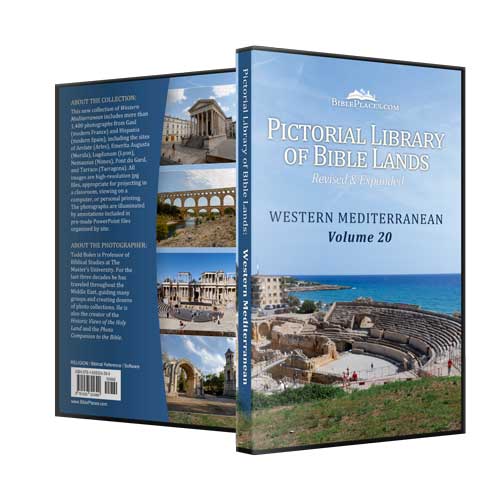
Western Mediterranean: New Volume in Pictorial Library of the Bible Lands Series


BiblePlaces has released a new volume (#20!) on the Western Mediterranean in their Pictorial Library of the Bible Lands series. This one includes sites in Gaul (France) and Hispania (France).
All images are high-resolution jpg files (2400 x 1600). Ideal for projecting in a classroom, viewing on a monitor or printing. Also included on each DVD are pre-made PowerPoint presentations for each region (with photograph annotations), maps for site identification, and an image index.
These have been excellent and well-organized resources with outstanding photography. As for this volume, be sure to read Todd Bolen's description in the June 2020 newsletter HERE. Whether or not Paul ever made it to Spain, the main takeaway is that their are Roman structures built in the same time period as the New Testament that are much better preserved in Gaul and Hispania. You can get a much better idea of what things actually looked like. At the newsletter link, you can find a link to download a PowerPoint with an East/West comparison of similar structures that is very helpful.

Wednesday, February 26, 2020

Smithsonian releases 2.8 million+ images that can be used for free


This appears to be a new announcement, and here is the article I stumbled across on Twitter:
The Smithsonian has released more than 2.8 million images you can use for free - Included are images from all 19 Smithsonian museums, nine research centers, libraries, archives, and the National Zoo (Altogether, the Smithsonian site says 16 million records and 4.2 million images, audio, and video.) What's really helpful is that the collection is listed with a Creative Commons Zero license, making them free of any republishing restrictions.
As you can imagine, with that many images/resources, it will require some serious searching to find something that you want. Use the starting search page which will provide suggestions once you start typing in a term (cf. above) to get you to the results page which will allow you to start refining the search.
 As this screenshot shows, you can start using inclusion/exclusion terms based on type, place, media, etc. (On this search for Jerusalem, note the line of red characters indicating what I've added and removed. I had to remove -topic:"Dicotyledonae," because there were over 200 images of this particular plant recorded from Jerusalem.) Note that results not only include images, but a variety of media. E.g., a search on "Jesus" included a link to the Smithsonian Channel and this video on "The Science behind Crucifixion" with the famous ankle bone with the nail of the crucified man.
There is plenty of Bible-related artwork, and I did come across some interesting old photographs from the early 1900s. HERE is a stereoscopic one from Corinth in 1903 of the Temple of Apollo. (You're likely to get better results more quickly using BiblePlace's "Historic Views of the Holy Land," however!)
If you find something really interesting, please let me know!

Monday, January 27, 2020

BiblePlaces.com celebrates 20 years!

BiblePlaces.com by Todd Bolen is one of the premier sites on the web for finding photos of biblical places. The photo collections are outstanding and include ones that are organized based on historical views, regional groups, and books of the Bible. In his latest newsletter he describes the 20 year history of this web site and the work he's done. It's a fun read, and if you go all the way through, he shares a "Galilee: Then and Now" set for free. It's in the PowerPoint format that he's been using to organize photos and include the information and biblical links needed to make sense of the pictures. You can see more of his pictures and helpful overviews of Bible places by checking out the SITES.
While at BiblePlaces, also check out his blog with weekly updates of info related to the Bible, archaeology, mapping, museums, and more. Better yet, just sign up for his newsletter!
Congratulations to Todd Bolen and the others at BiblePlaces for 20 years!

Wednesday, February 20, 2019

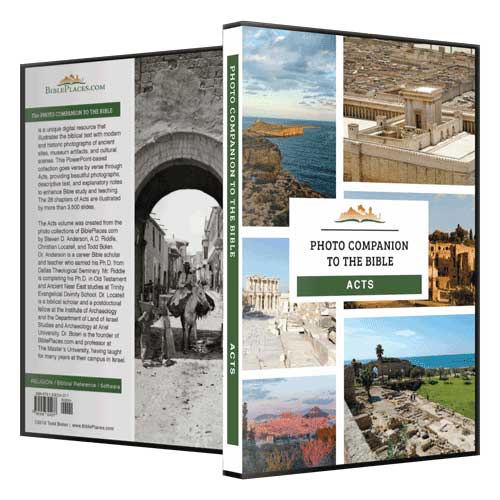
Photo Companion to the Bible ACTS - Review


In addition to his informative blog, Todd Bolen at BiblePlaces.com has been compiling some excellent study resources, the latest of which is the Photo Companion to the Bible volume on Acts. Previous volumes on Ruth, Psalm 23, and the Gospels have been released. The primary creators of the Acts volume are Steven D. Anderson, A.D. Riddle, Christian Locatell, Kris Udd, and Todd Bolen who have provided most of the photos and commentary. According to the introduction:
The Photo Companion to the Bible is an image-rich resource for Bible students, teachers, and researchers. Just as a librarian stocks the shelves with as many relevant materials as possible, so we have tried to provide a broad selection of images. Our goal is that you will find in this “library” whatever it is you are looking for. 
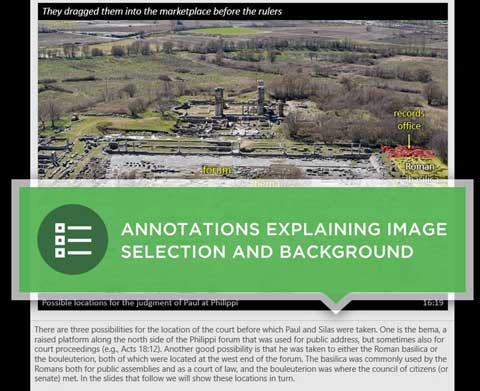
The volume is organized into 28 PowerPoints, one for each chapter of Acts. This makes it convenient to search for images connected to a chapter in Acts. Further, each of the images in the PowerPoint is labeled with a verse number and order sequentially. There is a variety of images included: photographs of sites, artifacts, historic photographs, aerial views, and maps. Where it would be helpful, some photographs are duplicated and include an overlay labeling notable features. (Many images come from BiblePlaces’ Pictorial Library of Bible Lands.) Each slide includes the portion of the verse to which it relates, the chapter:verse reference, and a descriptive caption. In the comments section of the PowerPoint, additional information is provided.
There are over 4000 images in the Acts collection, and the 28 PowerPoints take up about 1.6GB of storage. There are between 65 and 250 slides for each chapter. The maps provided by A.D. Riddle are very nice, and most of the pictures are of high quality. As for permissions, it states, “The purchaser is granted permission to use this work in face-to-face teaching, video-recorded sermons, class notes, church newsletters, and like contexts.” Any other use would require specific permission.

This resource will certainly be useful to anyone teaching or studying Acts and looking for visuals. Whether it is a location (e.g., Capernaum), topic (e.g., Baptism), or reference (e.g., “times or seasons”), there are multiple images that can be used. To have everything organized by specific Bible reference simply makes things much easier to access. Some items are very loosely connected with the text, and there are a few identifications or comments with which I might quibble, but overall this is a fantastic and immensely helpful resource.

The list price is $149, but the introductory sale price is $89 which includes free shipping in the US as well as immediate download. For a sample of what this outstanding collection is like, you can download for free the PowerPoint for Acts 18.

Disclaimer: I provided a couple pictures of a memorial to Paul at Apollonia for which Bolen provided me this volume for free.

Saturday, January 26, 2013

Picture Taking Tips on Biblical Site Tours - Part 2

In the previous post, I expanded on some of the excellent points about picture taking made by Charles Savelle. In this post, I'll add a few additional observations of my own that arise more from my experience than because of my expertise.

What kind of camera should I use? You may already have a camera you like, but if you don't, here are some things to consider.
  • Today's compact point-and-shoot cameras are incredibly capable. They really can do just about everything and take very good quality pictures. Probably a key factor in your decision initially will be price. You will pretty much get what you are willing to pay for. I wouldn't worry so much about the number of megapixels. Pretty much any camera with 12mp or more is going to be fine. Another key factor is size of the camera. Do you want one that is very compact and pocketable but sacrifices a few features? Or are you willing to get a somewhat larger camera? If so, the main thing you will gain is zooming capability. Most point-and-shoot cameras start with 24-28mm at their wide end. (Ranges are usually measured in terms of their 35mm film equivalent, and at the wide end, the lower the number the better.) I think most people would be satisfied with a camera that has 5-7x zoom, but 10x or more zoom will give you more options. I doubt that you will need the 50x zoom some of today's cameras are capable of, but they are available. One other factor that is important to me is having a camera with a viewfinder. I find it hard to hold the camera in front of me to shoot, and it can be really hard to see the screen in bright light. HERE are some point-and-shoot cameras to check that have viewfinders. My daughter went on a mission trip to Africa this past summer, and she got excellent pictures from a Panasonic Lumix FZ47 12.1Mp camera with 24x zoom. Check reviews on Amazon or a site like DPReview to get more info on cameras you are considering.
  • UPDATE 2016.11: The camera market has changed considerably in 3 years. I now recommend that you start with this Digital Photography Review Buying Guide to start finding the best camera for you. I now use a Pentax K-30 with a Pentax 18-135mm lens, and this combination has the benefit of being weather-resistant. I.e., I can shoot in the rain and snow.
  • Given the quality you can get with a point-and-shoot, what's the advantage of getting a larger DSLR camera for which you use interchangeable lenses? First, you should be able to get higher quality photos simply from the technology used. In particular, a DSLR should be able to do much better in low light situations, especially if you save your pics as RAW rather than just JPEGs. Second, you can be more particular about the kinds of pictures and how you want them to look because you are able to use a lens that is best suited for a particular type of photo. Of course this all means more money and more equipment and more weight to carry around. Personally I use a Pentax K-x which is one of the smaller, entry-level DSLRs (now discontinued and replaced with the K-30). From my experience, I've ended up using a relatively light and simple kit that has an 18-135mm lens (27-202mm 35mm equiv) and a ultrawide angle 10-20mm (15-30mm 35mm equiv) lens. The 18-135 is used for 75% of my pics. For touring biblical sites and getting interior shots in close quarters, I've found that I've wanted a wider angle lens more than I've needed a longer telephoto. (I do often carry around a 55-300mm = 78-450mm equiv for telephoto needs.)
  • UPDATE 2016.11: I've also found that I needed a faster lens (i.e., a lower base f-stop number) to get pictures of artifacts in museums where--if pictures are allowed at all--flash is not allowed. My fastest lens is a 50mm f1.8, but that's a bit long for many indoors shots, so I've ended up using a 35mm f2.4. Money is the limitation on getting faster lenses.
  • UPDATE 2018.08: Photography equipment continues to evolve rapidly. Many smartphones these days have quite excellent cameras that will satisfy most needs. Mirrorless and Micro 4/3 cameras are much smaller than DSLRs, but they can match image quality.
Know your camera! Don't buy a DSLR just before you go and expect to get good pictures. Even with a point-and-shoot, however, you really need to have some practice with it and familiarize yourself with the camera's features. Check out all the modes that are available. Know the limitations of flash. If the camera allows for some manual selections know when and how to use them. One of the really handy features on many newer cameras is a panorama feature that allows you to scan across a scene, so know how to do it. (While handy, the result is a lower resolution photo. To get better quality, know how to take a sequence of shots and plan to stitch them together later using software.) Going to a different timezone, know how to change it.

What other gear do I need?
  • Unless you have a pocketable camera, spend some attention on a camera bag that you like and can use effectively. Do you want something hanging around your neck or shoulder or around your waist? Personally, I don't like a bag bouncing around at my front or side, so I prefer a waist-pack or a sling bag. The advantage of these is that you can swing them around to get at your gear and have both your hands free. 
  • As noted before, bring plenty of memory cards.
  • If your camera can accept it, a hood for the lens is very helpful. Another item to consider is a circular polarizing filter. There is usually lots of bright sun, and it will help to use these to cut down glare and flare.
  • Cleaning supplies: A small microfiber cloth will be handy to have, and a LensPen is also crucial. With an interchangeable lens system, bring along a rocket blower too. There's plenty of dust around to get in your camera.
  • Batteries and charger! Make sure you have a backup battery set. Also make sure that your charger will work on non-USA electrical systems and that you have the proper adapter to let you plug it in.
  • Tripod? It's a nice idea and is important for critical photography, but... I don't think you'll use it. For one, it does take up room in your luggage. (So, if you do get one, make sure it's one that folds down small enough to fit in your luggage.) Second, and more importantly, I don't think you'll have time to use it. When you are with a tour group, you are usually moving right along, and you just don't have to set up. (If you're traveling on your own schedule, then do consider bringing one.) As an option that I have used, consider instead bringing a monopod. They are lots easier to carry and faster/easier to use. They are especially useful if you have a long zoom and need some extra stability. Want something even more portable but still functional? Try a cheap, DIY string tripod!
  • Flash? Again, a nice idea, but I've just not been able to justify the weight and bulk. In most instances, if you need more than the built-in flash on your camera, you probably need to be serious about the lighting. Using an external flash takes some practice to get things right, so if you do bring one, know what you are doing. Workaround: I added a 'flashlight' app to my smartphone, and in smaller dark settings, it really helped.
  • Other stuff: If your camera is able to use a remote control, they are pretty small to bring along and may come in handy. I also put a bunch of business cards in my camera bag. They help identify my gear, but if I take pics of people, I can give them my card, and they can email me if they want me to send them the pic.
Practice photography etiquette.
  • If you are at a site and lots of people are trying to take a picture, take your picture and then get out of the way.
  • Be aware of when you can (or should) use flash. Many museums do not allow it.
  • Is your bright screen disruptive? Turn it off.
  • Does your camera make a noticeable sound when taking a picture? See if you can turn off beeps and such or don't shoot when it may disturb others.
  • Stay on the paths where requested. Don't be risking your life or endangering ancient artifacts by climbing up somewhere. In Israel, when the sign says to stay out because there are potentially landmines present, obey the sign!
  • If taking pictures featuring people, get their permission if it feels like you are taking a specific picture of them. Oftentimes it simply means holding up your camera, nodding, and saying, "Photo?" Remember that the people live there. They are not there simply for your viewing pleasure.
  • If you are with a group, stay with the group. As a tour leader, I'm always conscious of people who are wandering off or who are delaying the whole group while taking pictures. Don't be that person who is always the one the rest of the group is waiting for.
  • I have mixed feelings about taking pictures while the tour guide is speaking. On one hand, you want to be polite, so don't be disruptive and make a scene while the guide is speaking. On the other hand, you paid for this trip and are paying for the guide, and the guide is usually hurrying the group along, and you really want to get some pictures. The best thing is simply to use good sense and practice common courtesy.
Consider using video or audio comments. You may not think so at the time, but I guarantee you will take photos that later you will not remember taking and not have a clue why you took it. One way I've used to remember what pictures I've taken is to shoot a short video of the scene and describe what's there. Most cameras these days also have a video feature or else use your smartphone. Some cameras allow you to add audio attachments to a photo. Also, take pics of signage.

Consider using GPS. If you want to remember where you were when you took a picture, use GPS. Some cameras these days have GPS included and while include the location data directly with the photo. If your camera doesn't have that feature, you still have some options:
  • One option is to use and Eye-Fi Pro X2 SD card. They are rather more expensive than regular SD cards, and their geotagging depends on wi-fi network positioning, so it is not likely to work well in remote locations.
  • Your smartphone or tablet probably has GPS capability, or maybe you are a runner and have a GPS watch. You can use these devices and free software like Runkeeper or Endomondo to map the path you took while going through a site. (HERE is an example of how I used it.) Then you can use Google Maps or Google Earth to retrace your steps. With some sites, Google Street View will even let you walk through the site, and you can confirm your pics. Check this post.
  • Even better, if you have a GPS device, you can automate the process. Make sure the time on your camera and your GPS are the same. Track your path and save/export the GPS file (GPX or TPX file) it generates. Then use the free Geosetter program which allows you to synchronize the GPS data with the timestamps on your pictures and automatically apply the location data to the metadata of the image file.
  • If you offload your pictures to a computer, most image software (e.g.Google Photos, Lightroom) allows you to pinpoint the photo location on a map. Another good option is Geotagger or Geosetter.
Have a 'theme' for your trip. If you don't want your pictures to look just like everyone else's, consider adopting a theme for your trip. Maybe you want to be especially attentive to taking pictures of food or including cats in the picture. (There are plenty of free-range cats and dogs in Turkey/Greece/Israel/Jordan/Palestine!) Or maybe look for a particular color. How about the ornate capitals on all the columns you are going to see. Maybe bring along some little token like a stuffed animal and include it in your pictures. One of the benefits of having some kind of theme like this is that I've found it helps me see more. Instead of being overwhelmed with all there is to see, I find I see more when I'm looking for something in particular.

Try to practice photography and not just take pictures. This is harder to do and is moving from simply documenting a site to trying to capture the essence of the site. Is there a photographic opportunity you see that with one picture will help you recall the experience of that site? Can you find a scene that tells a story related to the situation? Be aware of the light and shadows and lines and patterns. Here's where you start thinking more like a photographer and an artist than simply as a tourist.

Relate your picture taking to your devotional practice. If you have some kind of morning devotion, use that Scripture to inspire you throughout the day. Where does that Word of God connect with what you are seeing. I'm not thinking so much literally: it's a passage about Paul in Ephesus so you take a picture of Ephesus. Think spiritually and abstractly! How is what you read experienced in what you are seeing.

Enough of me. Some other basic picture taking tips here. If you have other good suggestions, please comment!

Picture Taking Tips on Biblical Site Tours - Part 1


Charles Savelle at BibleX has posted an excellent series on Picture Taking Tips for the Holy Land, Part 1, Part 2, and Part 3. [HT: Todd Bolen at BiblePlaces] You will want to read his full posts, but I'll simply bullet-point them here, and add some additional comments of my own. I'm not a professional photographer either, but I've been working on improving my photography, and I've taken enough trips and photos to have opinions and thoughts on the matter!

  1. Take pictures of signage. This is really helpful.
  2. Look behind you as well as ahead of you. And look up and down and to the sides!
  3. Don’t be afraid of having people in the pictures. In addition to the points that Savelle makes, remember that your trip is not simply a biblical / archaeological tour. It is also a cultural experience. Sometimes people can be the point of the picture.
  4. Decide why you are taking pictures. This is one of the most important points Savelle makes. Are you really going to want to look at all those pictures of rocks and ruins again? Is anyone else going to want to see all your pictures? What do you want to do with your pictures when you get home? Are you simply 'documenting' the site?
  5. Study what others have done. Great advice. It's another way to think about why you are taking pictures. With so many great pictures available for free on the Internet (do always check copyrights, but many really are free), is your time well spent trying to get a picture of something for which there are already hundreds of pictures? Or are you better off just observing and experiencing the site and the moment? People who aren't worried about getting pictures usually are a bit more relaxed and able to enjoy the site more!
  6. Ask the tour guide for suggestions.
  7. Have your camera ready and not tucked in your backpack. Indeed! I'll mention it again in point 11 below, but when I wasn't carrying my camera around, I usually was carrying my smartphone and could use its camera.
  8. Don’t forget to think small. Holy Land trips are basically large-scale affairs. Also keep in mind that the Bible talks about birds and flowers and insects. You might want to include these in your portfolio of pics. And the food! And the colors!
  9. Take more rather than fewer pictures. Yes, but delete and edit before you share them with others! I also recommend taking your pictures at the highest quality your camera allows. Yes, each photo will take up more space as a larger file, and thus you will need more memory cards, but it will be worth it. If you are really serious about photography, you probably know that you should be shooting RAW.
  10. Download and review your photos each night on a computer (if you bring one). This is hard to do when you are tired and have a busy schedule, but it is important. Savelle actually is talking about offloading pics from your memory card (in order to free space on it), but I think you are better off just downloading and leaving pics on the card. This way you will have a backup of your pictures if something should happen to the camera, the card, or your computer. Memory cards have become relatively inexpensive, so you really are better off just buying plenty of memory cards.
    Another option to consider is uploading your photos nightly to an online storage service like DropBox, SugarSync, Google Drive, or Windows SkyDrive. Of course using this option means that you are counting on having regular access to the web and the time to upload a few hundred megabytes of pictures each day.
    How much memory do you need? I probably take more pics than the average visitor, and on a two-week trip to sites in Turkey and Greece, using a DSLR 12Mp camera whose JPEG pictures were each about 5-6Mb in size, I took about 1800 pictures. (I.e., I averaged a little over 100 pics each day.) Total space used was less than 10Gb. A four-week trip in Israel ended up with over 3500 pics and less than 19Gb storage. [2016.11 UPDATE: I'm now using a better camera and shooting RAW pics. These are about 14MB/pic, so I'll be bringing more SD cards, but really my 64GB should be sufficient.] If you are able to back up your photos each day, you should consider just getting a 16Gb or 32Gb or 64Gb card and being able to keep all your photos for the whole trip on one card. If you won't be able to back up your photos, I'd recommend getting multiple 4Gb or 8Gb cards. That way, if something should happen to the camera or the card, you will at least have some photos still saved.
  11. Consider what you will do if your camera breaks on the trip. Yes, it happens. I have two backup plans. 1) I bring along my old 7Mp compact point-and-shoot which still does a serviceable job. 2) I don't use my smartphone for calling, but I can use the camera or video in a pinch.[2016.11 UPDATE: Smartphone cameras have really improved. They are also able to do all sorts of other clever things including easy panorama shots. I do bring a second camera body, but I also now do this because I have my walk around lens on the primary camera and a ultra wide angle lens on the other. I found that if I couldn't get the shot I wanted with my 18-135mm lens {27-207mm 35mm equivalent}, it was usually because I needed wider. When going with a tour group, one just doesn't have time to keep switching lenses.]
In my next post, I'll add some additional points of my own.

Thursday, January 17, 2013

Touring Israel in Google Street View


As reported in the Google Earth Blog,
Google has rolled out a rather substantial Street View update this morning, covering hundreds of towns in Israel and updating various other cities across the world. Some of the highlights include the Sea of Galilee, the Western Wall and the Bet She'an National Park. 
In the graphic at the top, all the blue lines show where Google Street View is available. (The blue dots are links to photographs.) Lots of touring in Jerusalem and along the western part of the country, but do note that you can take a nice trip down along the Dead Sea and catch glimpses of Qumran and Masada as you go. They even drove into Ein Gedi. If you click on the Bet She'an link in their blurb, you'll see that they walked around the site and looks like this:
They also went up to the top of the Arbel and walked around there as well. (click on the link to see for yourself)

You can get a view of the archaeological work at Magdala.

They didn't go along the north or eastern shore of the Sea of Galilee, so no view of Capernaum (except for a little detour into the resort next to the Greek Orthodox holdings in Capernaum).

They did take a complete and thorough tour of Chorazin, however. Check out the synagogue there. There is also a very nice tour of ancient Tell Dan, including the Israelite gate complex,the middle Bronze arched gate, and the sacred high place. There is also a complete tour of Tell Hazor. Be sure to visit the palace. And the Herodian amphitheater at Caesarea. The well at the gate of Tel Ber Sheva. The lovely bell caves at Beit Guvrin / Maresha.

Okay, you get the idea. This really is spectacular. If you find some other favorite Google Street View archaeological sites, please add them in the comments.

Thursday, November 15, 2012

Free Art Catalogs and Guides from the Metropolitan Museum of Art

The Metropolitan Museum of Art recently (?) launched a MetPublications site that will be of interest to biblical scholars. Its purpose is described on its About page:
MetPublications is a portal to the Met’s comprehensive publishing program. Beginning with nearly 650 titles published from 1964 to the present, this resource will continue to expand and could eventually offer access to nearly all books, Bulletins, and Journals published by the Metropolitan Museum since the Met's founding in 1870. It will also include online publications.
From a biblical perspective, you might want to search using thematic categories using such ones as:
Some of the books are only offered in Google Book Preview, but most are free, downloadable PDFs. Here are some I found that were particularly interesting:
I am not an art specialist, so the first two "Resource for Educators" guides were especially helpful. (How do you know if a depiction is that of an Assyrian deity? The guide will tell you.) Coming from an art museum, there are many graphics, illustrations, photos, and descriptions of many notable pieces from antiquity. Lots of archaeological stuff and much more...

[HT: Stephen's Web]

Thursday, September 27, 2012

Bethsaida 2012


This photo book provides a quick overview of the first two weeks of the archaeological dig at Bethsaida this summer. I did it for my own collection, so it features ME!, but there is enough general information to be helpful to others.

I'm well aware that there is some skepticism whether e-Tell actually is Bethsaida. After digging at the site, I think I’m supposed to be a true believer that it is!

Well, I’m not a true believer, but I’m pretty much persuaded. They have determined that there was some kind of lagoon system below e-Tell in the 1st century, so it certainly was accessible to the Sea. I wonder if maybe things were already getting difficult, and it perhaps is not a surprise that the New Testament locates Peter, James, and John in Capernaum rather than their home town of Bethsaida. It would be a lot more convenient. In terms of artifacts, there is much to commend e-Tell (especially as compared to the Araj site for which there is not any excavation evidence yet). We and others before us found Herodian lamps, limestone vessels, and coins that all indicate 1st century BCE/CE Jewish habitation. (We found a silver Cleopatra coin while I was working from late 1st century BCE.) In terms of architecture, they were working in one area that was 1st century CE. What’s missing to confirm identification as the Bethsaida? Well, it still doesn’t look like it was much of a polis. Of course there is still lots to excavate, but no sign of Philip’s tomb which I’m kind of imagining to be at least close to the scale of Herod’s at Herodium. There’s the Temple, but it’s hard to see how it was very impressive as anything in the 1st century. No synagogue found yet either. Still, there is still a lot of the site to be investigated. 

For more info about this dig, check at the official site at the University of Nebraska-Omaha (where Rami Arav teaches) or the semi-official site run by Shai Schwartz.

Thursday, October 1, 2009

glo - Multimedia Bible

This one looks interesting... glo is a new multimedia Bible program. Appears to be geared more to a popular than scholarly audience, but it looks to have some interesting features. Lot of emphasis on visual interaction and visualizations.It's hard to tell, and they don't include it with their advertising, which Bible versions are included. (Hmm....? I do see NIV on the video.) Check out the video:

Note that it is Windows only for now with a planned for release on 15 Oct 2009. (Mac version is promised) It will cost $80 (pre-order for $60; also at CBD), but here's the number that caught my attention: 18Gb. That's how much room it takes on your hard drive. Don't have that much free? They recommend deleting unused files, getting a bigger hard drive, or buying an external drive.
It's produced by Immersion Digital whose CEO was (is?) connected with the iLumina line of interactive and media-oriented Bible software. If they send me a copy, I'll review it here, but if you have more info/experience with it, please chip in.

Thursday, January 22, 2009

Virtual Walking Tour of Al-Haram Al-Sharif = Temple Mount

The January/February 2009 issue of Saudi Aramco [yes, the oil company] World magazine (v60 #1) features a virtual walking tour of Al-Haram Al-Sharif (i.e., The Temple Mount) in Jerusalem. [HT: G.M. Grena on biblicalist] It really is an excellent tour. HERE IS THE LINK to start the tour. You will find an easy to navigate site with full 360 views along with zooming. You can either let the tour run automatically or wander off on your own. The photography--by Michael and Barry Gross who also worked on the "Rome Reborn" project--is outstanding, providing a number views most tourists will never get. You can move around the views while listening to the audio guide or simply read the narration written by Oleg Grabar, Professor Emeritus of Islamic Art and Architecture at the Institute for Advanced Study at Princeton, New Jersey. He is the author of The Dome of the Rock (2006, Harvard) and The Shape of the Holy: Early Islamic Jerusalem (1996, Princeton). There are 32 quality views in all, including both exteriors of the the mount as well as interiors of the Dome of the Rock and Al-Aqsa.
Though written primarily from the perspective of Islamic history, the narrative does make reference to the Solomonic and Herodian Temples that once stood on the Mount. The full tour takes about 30 minutes to see/hear everything. Highly recommended.
(Note that from the link above, you can also access similar tours of the Suleymaniye Mosque in Istanbul and the Alhambra in Granada, Spain.)

Monday, January 19, 2009

Biblical Art, Photos, and Graphics

I just updated my page collecting resources for Art, Pictures, Music, and Video, particularly ones that are Bible- or Christian- related. What you may find particularly helpful is that I've been playing around with Google Custom Search, and I now have created a search engine that I think is the fastest way to find biblical art, photos, and graphics on the web. For a description of the sites it searches, you can go to the Art, Pictures, Music, and Video page and use the search engine from there, or you can test it out here:


Thursday, July 24, 2008

Codex Sinaiticus Online

There has been considerable media coverage about Codex Sinaiticus being brought together online from the various libraries where it is now housed. The best place to track down the reports is over at PaleoJudaica where Jim Davila has been on top of things. It is, as of today, now officially online. I just checked it out, but the site is too busy to be serving up pages at this time. The previews and promised resources will be great.

Thursday, June 26, 2008

NET web site - Biblical sites information

The NET (Near East Tourist) Agency just updated their web site, and it is well worth a visit. Yes, it is a travel agency site, but it also provides an incredible wealth of information on the biblical locations in the Holy Land and Jordan one is likely to visit. (The sections on Turkey, Greece, and Italy are still under construction.) Stephen Langfur, a reliable and well-respected guide, provides most of the commentary. In addition there are lots of maps and pictures (I am happy that he was able to use a number of my pictures) and some excellent use of GoogleEarth to illustrate features of various sites.

Sunday, May 18, 2008

Pictures are worth ... a lot: Resources for Biblical Pictures

Sometimes you really need a picture of a biblical location to tell the story. Where, for example, are you going to find a picture of Jerusalem from the Mount of Olives like the one above?

There are a number of issues to consider when looking for biblical pictures. First, you want pics of suitable quality. Be sure to preview the picture in the format you plan to use it. Second, the photo should tell a story or help you to tell the biblical story more clearly. Some resources provide clear descriptions to help you in this way. Third, do you want actual photos or drawn pictures/illustrations. The list I have created is focused on photos. For drawings/illustrations, check the Bible Illustration blog. Finally, one of the main issues you need to keep in mind is whether you can obtain permission to use a picture. (I've talked a bit previously about copyright issues with regard to biblical maps.)

I have compiled a list of programs, sites, and other resources that provide access to photos of biblical sites. I have a description of about 20 such resources for now, but I suspect that there are many more. Leave a comment, and I will update the list.

In addition to the descriptions, I provide some example pics (I am particularly amazed by the examples I show of what GoogleEarth and Microsoft VirtualEarth can do of replicating real, on-the-ground pics), and a summary of recommendations. If you are in a hurry, here are my recommendations for now:

Summary

For high quality, high-resolution pictures:

Best online sites:

Ways to get pictures to use in your own presentations (i.e., clear use permissions)

  • Holy Land Photos: Clear and generous permission policy; excellent quality
  • Most of the packages that you buy allow for presentation use
  • It will take some checking, but many pictures on Flickr have clear Creative Commons usages described
And here again is the complete LISTING of programs, sites, and other resources. Let me know if you have others I should add.

Sunday, June 10, 2007

Jerusalem PhotoCarousel

Experimenting here... Enjoy this photo carousel that is a mashup using Microsoft's new Silverlight development tool on their Popfly site. This particular mashup uses the photo carrousel as one block, and then I set it up to draw in any picture from flickr that has a "Jerusalem" tag. (It's supposed to work on both IE and Firefox, but I can only get it to work on IE. Note that you can 'pull' the images around and click to magnify. BTW, this looks much better on a full screen like THIS rather than this small column.)