![]() |
| 2 John Sanky Diagrams Section Headings From https://www.openbible.info/labs/bible-section-sankeys/ |
Friday, October 11, 2024
How do the English versions break the text into sections?
Posted by
MGVHoffman
at
12:09 AM
0
comments
Labels: online resources, visualization
Tuesday, January 7, 2020
More biblical text visualizations
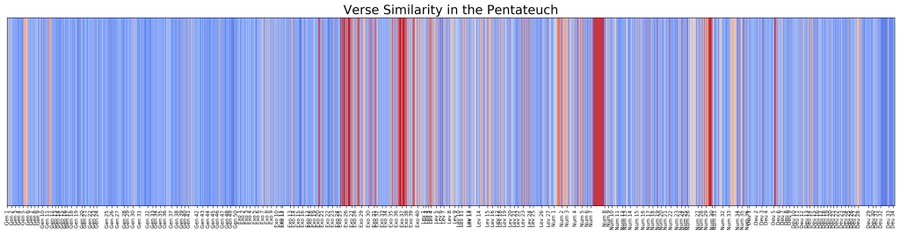
The first is by Cody Kingham who writes:
Formulaic Language in the PentateuchAlso in that Twitter thread, Camil Staps writes:
In reading through the Pentateuch, I've noticed that several sections contain a lot of repetition. This formulaic language seems to serve as a way of organizing and carefully structuring segments of text. In this notebook, we will visualize this phenomenon in the Pentateuch with a heatmap. A heatmap is a graph which visualizes integers as "temperatures". The lower a value, the "cooler" it is, and vice versa. The colors blue and red are used to represent cold and hot values.
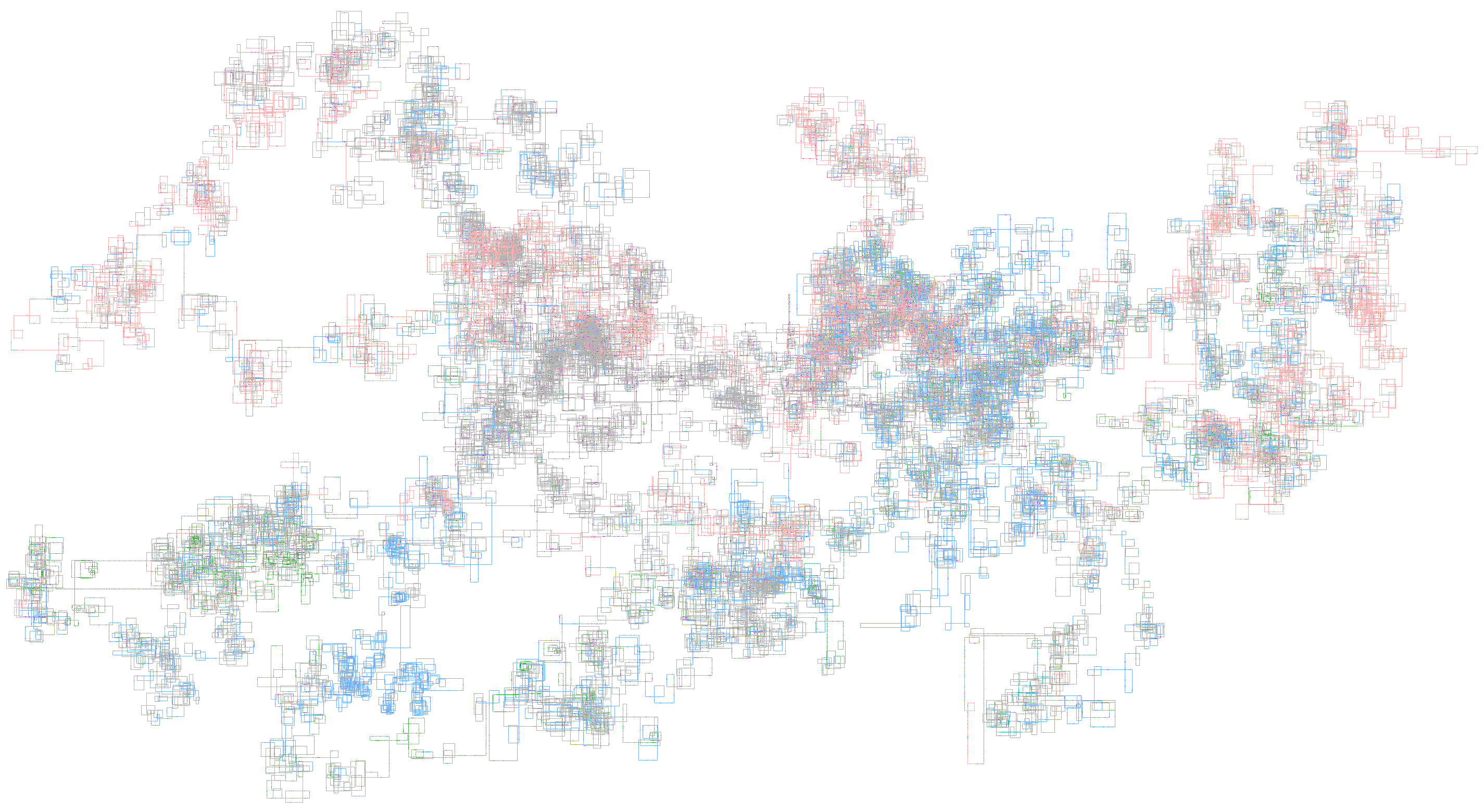
Here is a similar project of mine: on the internet, which verses are frequently mentioned together? There's quite some noise, but nevertheless you can see the popularity of Gen 1-11, Ps & Isa, vs. e.g. Est & Lam. Also note the synoptic parallels in Kgs/Chr and Mt/Mk/Lk!
Posted by
MGVHoffman
at
11:46 PM
0
comments
Labels: visualization
Tuesday, October 20, 2009
ImageChef: Word Mosaic Creator
I've been fascinated by word visualizations, and here is a new one similar to the now popular Wordle. ImageChef allows one to define a shape for the words you supply. The free version is somewhat limited. The Pro version starts at $10 /month. Here's Mark 15.34 where Jesus is citing Ps 22.1. There are some other fun visualizations at the site to check out. [HT: Jane's]
Posted by
MGVHoffman
at
4:12 PM
0
comments
Labels: visualization
Friday, July 3, 2009
Google Proves: Jesus Is Bigger than the Beatles!
Okay, now that my title got your attention, it's an excuse to point out another Google Labs tool called Google Trends. It allows you to compare up to five terms, and it returns results showing relative frequency in search requests and news articles. Results can be further refined by date and (sub)regions. So, I tried comparing: jesus, beatles, "michael jackson".
As the chart shows (clicking on the chart will bring you to the actual results), Jesus has always been bigger than the Beatles! Michael Jackson (during his trial in 2005 and now with his death reflected in the sharp spike at the latest date) has occasionally outdone Jesus.
As with all statistics, results may not be entirely meaningful and can be easily manipulated. (E.g., in my search above, it doesn't distinguish between Jesus Christ and any person named Jesus.) I was trying to think of some other meaningful searches, however. How about: "old testament" apocrypha "new testament"
As you would expect, the Apocrypha greatly trails either of the Testaments, but perhaps you might not have predicted that the OT and NT would in fact be so close in 'popularity'. Also note in this example that the most popular references are highlighted in news articles. Clicking on the "More news results" option will bring you to the News Archives Timeline where you can refine time periods for your search.
One more example I searched for is: "gospel matthew" "gospel mark" "gospel luke" "gospel john" (Note that I had to do it this way, because if I just did "matthew, mark, luke, john," all the references to John McCain and the presidential elections dwarfed everything else.) Now before looking at the chart, do you have a guess about which Gospel is most popular? (And in this case, I focused my results on just the United States.)
As one might have expected, John is the most 'popular' Gospel. I had thought that I might see some changes in interest related to the changes in focus based on the lectionary cycle, but the results are minimal. Do note in this example the additional data about results related to regions. Nebraska and Rhode Island (go figure?!) were the top spots searching for the Gospels. The relative popularity between the Gospels is also distinctive with Tennessee, Alabama, and North Carolina showing a distinct preference for John. Rhode Island showed the most balance.
The data can also be exported into a CSV file for further inspection/manipulation in Excel.
In any case, I'm not exactly sure how to make good use of this research tool, but it is interesting. If you come up with something significant, please share it here.
Posted by
MGVHoffman
at
10:41 AM
2
comments
Labels: online resources, visualization
Thursday, June 4, 2009
Google Squared and Biblical Studies
Another interesting new project from the Google folks is called Google Squared. What it does is attempt to create a grid of related data based on search parameters entered by the user. According to its developers:
Google Squared is a search tool that helps you quickly build a collection of facts from the Web for any topic you specify.There are some interesting examples of what it can do here, but I thought I would try some examples related to biblical studies. I was trying to think of some things that might be interesting in a grid, and I first tried listing the codices "alexandrinus sinaiticus vaticanus bezae." As you can see in the results below, it got some aspects correct but missed badly on others.
- Facts about your topic are organized as a table of items and attributes (we call them "Squares" for fun).
- Customize these Squares to see just the items and attributes you're interested in.
- See the websites that served as sources for the information in your Square.
- Save and share Squares with others.
Fortunately, you can easily delete rows or columns and just as easily create a new row or column with your own description.It also has a nice feature (when signed in to a Google account) of being able to save the grid. For example, if you click HERE, you can see a grid I generated using various English versions of the Bible. The results seem a bit more apt than my previous example, but there are some strange ones here too. (LOLcat is a textual basis?)
As an another experiment, I tried listing each of the four Gospels and came up with THIS. It does not provided particularly satisfying results. So, using another option with this tool, I started out with an empty square and built up my own grid by row and added columns using suggested parameters. (See the graphic below or click HERE.)
Again, some odd results... a picture of Matthew McConaughey for Matthew and Luke Skywalker for Luke? The descriptions, mostly from Wikipedia, are more often correctly linked, but using the suggested column parameters of Date of Birth and Died provided a very strange mix.So far this tool has provided some interesting connections but mostly it has provided comic relief. So I tried one more query that actually did return some perhaps insightful results. I typed in "Mark 6:34" and THIS is what I got. It appears to have taken the more significant words from that verse and returned separate analysis for each. That might have some value... (Different verses returned quite different results though...)
BOTTOM LINE: You would probably have to do quite a bit of customization to generate useful results, but some of the returns may be of occasional interest.
If you come up with an interesting query with helpful results, please share them here.
[HT: StephensWeb]
Posted by
MGVHoffman
at
9:17 PM
0
comments
Labels: online resources, research, visualization
Tuesday, April 7, 2009
Saint Catherine's Monastery in Sinai in Virtual 3D
I've previously mentioned the work of ARSights which provides virtual 3D, 'in your hand' representations of various locations. (Check these models of the Roman Coliseum and Solomon's Temple and accompanying videos to see how you can rotate and tilt the model in your hand.)
They just recently added Saint Catherine's Monastery in the Sinai to the collection now making 100 models available. Saint Catherine's is connected to the traditions of Moses and the burning bush, but it is also notable as the location where Codex Sinaiticus was found. As you can see in the static image above, it is a very attractive model. If you have already downloaded the free AR software, here is the direct link to the monastery.
Posted by
MGVHoffman
at
10:18 AM
1 comments
Labels: biblical resources, googleearth, visualization
Monday, March 30, 2009
Jonah - Hebrew Comic and more...
I've been really busy with other stuff to post much lately, but this one is so good, that I thought I'd give it a quick mention. At animatedhebrew, they provide an outstanding implementation of the book of Jonah in comic book form accompanied by a host of language options. They state:
Every word of the Hebrew text is included in this Jonah comic in multiple scripts (square, cursive, paleo-Hebrew) and multiple forms (consonantal, pointed, cantillated). You can also listen to my slow, deliberate read of the Hebrew text, and pause or repeat at any time. At the bottom of the screen you'll find ancient and modern translations that you can compare with the Hebrew text (Aramaic, Syriac, Greek, Latin, German, French, and 3 English translations). This comic is a great way to learn or practice your biblical Hebrew. It will help you develop an “ear” for the language and wean your dependence on pointed texts. For an extra challenge, use the 'no text' option to try memorizing the whole book. :)
Have fun playing Breakout while the program loads, and then remember that NEXT is following the Hebrew to the left! I'd love to see more of this type of multilingual learning resources.
While you are at the site, check out the great collection of other Hebrew learning resources (including Abbot & Costello learn Hebrew).
[HT: Theological German]
Posted by
MGVHoffman
at
10:49 PM
1 comments
Labels: biblical resources, greek, greek instruction, hebrew, hypertext bible, visualization
Tuesday, March 17, 2009
Solomon's Temple - Virtual 3D Modeling

I had previously posted about the work of ARSights (the AR stands for Augmented Reality) who have developed an app that allows you virtually to hold selected Google Earth 3D models in your hand. I had noted some models of potential interest to biblical studies (Parthenon, Coliseum). I had also contacted ARSights and suggested that they add the Jerusalem Temple to their collection. They wrote back and shortly afterward posted up a model of Solomon's Temple in addition to the Dome of the Rock. As the little video shows, it is indeed the Temple from Solomon's time and includes the walled city. Enjoy!
Posted by
MGVHoffman
at
10:36 AM
0
comments
Labels: biblical resources, googleearth, visualization
Saturday, March 7, 2009
The Coliseum and Parthenon in your hand
This is too cool... ARSights (the AR stands for Augmented Reality) has developed an app that allows you virtually to hold selected Google Earth 3D models in your hand. Here's the company's description:
ARSights is a new web-based tool which improves Google Earth visualization capabilities by enabling users to visualize digital content mixed with real world information. Built upon the technology known as Augmented Reality, it allows users to enjoy Google Earth digital content in an astonishing as well as completely new way. All you need to make ARSights work is a PC, a USB camera, a printed marker and AR Application which can be downloaded directly on www.arsights.com. The aims of the project can be summarized as follows:Here's what it looks like in practice:
- To increase people’s awareness about the power of Augmented Reality
- To let people access information in an immersive and more engaging manner
- To impulse a new development of this technology
- To foster new business opportunities in many fields of application
If you click on that graphic, you will see a short (and choppy) 40 sec video with me holding virtual models of the Parthenon and the Coliseum. You can see how the object can be rotated and tilted. (If I tilt it too askew, you will see that I lose the model momentarily.) For a better looking demonstration with the Eifel Tower, note this YouTube video from ARSights.You need a web cam, and other than that, it involves downloading the app, printing the 'foundation' card, and downloading the KML file for GoogleEarth so you can see the models available. There are over 70 models from all over the world available at this time. Nothing from Jerusalem yet, and the Parthenon and Coliseum I model are the most relevant biblical studies related ones for now.
[HT: Google Earth Blog]
Posted by
MGVHoffman
at
10:39 AM
1 comments
Labels: googleearth, visualization
Monday, August 18, 2008
The Future of Biblical Data?
Tim Bulkeley recently posted on his SansBlogue about the future of web browsing envisioned by Adaptive Path's Aurora project. Hmmmm... I think not. Way too complicated. Mechanical 3D mousing. Too many icons, too many clicks, too much ... I often evaluate technological innovation based on whether =1= I would use it (a techno-happy geeky sort), =2= my teenage daughters (digital natives though not techno experts), =3= my wife (digital user by necessity but adverse to needing techno expertise), and =4= my inlaws (well, let's just say they need more guidance than my wife...). I might use the Aurora interface, but I'm the sort who tries to keep my computer desktop pretty clean (in striking contrast to my physical desktop...). I doubt my daughters would use it and certainly not wife and inlaws. I like the collaborative aspect of it, and I think that will be part of the future, but it will have to be something simpler.
BUT
I did come across another vision of the future involving Freebase and the Parallax interface. You should probably put this under the category of "things I should be aware but don't really have to think about for now." First of all, what is Freebase? The site describes it as "an open, shared database of the world's knowledge." More fully:Freebase is the foundational 800lb gorilla in the semantic space, quietly building momentum to create a ‘global knowledge base: a structured, searchable, writeable and editable database built by a community of contributors, and open to everyone….It could be described as a data commons’.
What this means is that it is a bit like Wikipedia as it accumulates user-supplied information, but instead of being encyclopedic, it is designed as a structured database. For example, take a look at the Freebase page on Jesus. It is trying to fit info about Jesus into categories that are applicable to any other significant person: gender, birth and death dates, places of residence, ethnicity, religion, spouse and , children (none listed!), influences, peers (Jesus is without peer!), employment history, works by/about, etc. Freebase on its own is fully linked, so you can work your way through the data, but David Huynh has created the Parallax interface to manipulate the Freebase data. The video on the Parallax home page gives a good example of what it can do. Basically it is trying to display relationships between sets of data. The question used to demonstrate the interface is, "What schools have the children of U.S. presidents attended?" As you can probably surmise, you would probably start with a list of presidents, then find the children of each, then locate the school of each. Not a hard project, but it would be a lot of back/forth clicking. With Parallax, this becomes an easy search, and, in addition, you can even take the data a step further and do something like locating all the schools those children attended on a map.
Still technically in alpha, Freebase will be the underpinnings of many future companies - some would say this approach is the future of the entire Internet. [Source: ZDNET, "The Future of the Web"]
Okay, finally I come to the title of this post: What does this mean for the future of biblical data? For now, there is limited information about religious topics such as "Bible" or "Jesus." Here's the view of "Jesus" in Parallax which is simply pulling out the data from Freebase.
But consider these kind of questions:
- What people are designated as "kings" in the Bible?
- Which of these kings are non-Jewish?
- When did they live?
- Where did they live?
For now, the closest thing I can think of is the Bible People relationships tool found in Logos? Here's part of the Jesus graphic:
So, what questions would you like to be asking of the Bible once all the data was available to you?

Posted by
MGVHoffman
at
12:09 AM
3
comments
Labels: biblical resources, logos, online resources, visualization
Wednesday, July 16, 2008
Vocabulary Profiling
A lot of people have discovered Wordle lately and have been using it to make attractive word 'clouds' of biblical texts. (Our church is considering using it to create occasional bulletin covers.) While Wordle is attractive and gives a quick glimpse of important words in a text, for more helpful analysis of a text, you want something like the VocabProfiler. To understand what this tool does, it helps to understand a bit of corpus linguistics, but this blog posting will give you a quick background. I've talked about this kind of stuff before with reference to strategies for minimizing the amount of Greek vocabulary one needs to know. I'll summarize:
- A person needs to know about 95% of the vocab in a text to comprehend it without frustration.
- Analyzing large amounts of texts allow one to construct reliable frequency lists.
- In English, learning the 1000 most common words and their families will give you 74% comprehension. (The K1 list)
- Learning the next 1000 words and their families will add another 5% bringing one up to 79% comprehension. (The K2 list)
- Rather than trying to learn the next 1000 words which only adds 1%, it is better to identify the most common field-specific words, i.e., words used in a particular field of study or reference. For example, adding 570 word families of words in academic texts increases comprehension 8.5%. This group of words is called the Academic Word List. (AWL - In non-academic writing, it will provide much lower improvement.)
The words in blue are on the K1 list, in green are on the K2 list, in yellow on the AWL, and the red words are the remaining words. One of the things we can do is use this tool to compare translations. Below is 3 John in the NRSV. In this case, there is not much difference.
Another possible way of using this tool is to compare different passages using the same version. Here is Jude in the NRSV, and it is easy to see that there is a much higher percentage of red words as compared to the 3 John graphic.
[UPDATE: As Iyov helpfully notes in the comments, this tool only works for English and French texts.]Some practical applications of this tool--and you really should use the tool and see all the data it returns in addition to these highlighted texts--include the following:
- Identify the best words to memorize if one is learning English as a second language and is interested in biblical texts.
- It can be used to compare various translations to gauge the reading levels.
- A person can, of course, also run there own writings through this tool. Preachers, check out the likely-more-challenging words in your sermons! I suspect this tool will turn up a lot of 'churchy' words in red.
- You can see how James Tauber is trying to apply this kind of linguistics work to Greek (check this post and follow the links) and the development of a graded reader (check this post by James).
Posted by
MGVHoffman
at
12:34 AM
2
comments
Labels: greek instruction, visualization
Monday, June 16, 2008
Wordle Visualization
I'm gone for a couple days, and it's way too easy to get too far behind too quickly... Ah, the tyranny of blogging...
A post by Jim Darlack on his Old in the New blog brought my attention to the Wordle web site. As the web site says:Wordle is a toy for generating “word clouds” from text that you provide. The clouds give greater prominence to words that appear more frequently in the source text. You can tweak your clouds with different fonts, layouts, and color schemes. The images you create with Wordle are yours to use however you like. You can print them out, or save them to the Wordle gallery to share with your friends.It is FREE, and it works quite quickly even with big chunks of text. (It can't handle Unicode, however. UPDATE: It now does seem to deal with Unicode. Try the BPreplay Bold or Lucida Sans for Greek. SBL Hebrew or Lucida Sans for Hebrew. ) The graphic above shows the NRSV text of 3 John run through Wordle. It does a nice job of visualizing key themes in the text.
Logos does have a built in visualizer and the above graphic shows what it produces for 3 John. (How does one get this graphic? Use the Passage Guide and expand the "Important Words" section.) Not as attractive as Wordle, but you can choose whether to generate the word cloud in English or Greek.
Posted by
MGVHoffman
at
6:18 PM
3
comments
Labels: logos, online resources, visualization
Friday, June 6, 2008
Logos and BibleWorks Visual Filters
I have three previous, rather lengthy entries on the visual filters and text markup tools in Logos and BibleWorks7, especially on morphological markups. (HERE for BW7 and HERE for BW7 and Logos and HERE for Logos) A few new items have shown up lately that can be added to the discussion.
BibleWorks7: On the BW7 forum, Ewan MacLeod provided a helpful color file for highlighting otherwise all-to-easy-to-miss footnotes to the Westminster BHS (the WTT and WTM texts). This is a nice implementation of what one can do with text coloring. It is great to be able to share such files (posted in the forum). Be sure to follow his directions given in the third post. Additionally, there are a couple more color files on the unofficial BibleWorks blog including one that offers a words of Christ in red.
Logos: Phil Gons has a good blog post indicating how you can use the visual filters as a way of searching or scanning a text for certain features. He links to a number of blog entries and videos that describe other visual filters that come with Logos. One that is easily overlooked (okay, I just discovered in my Logos...) is the Eissfeldt visual filter showing his analysis of the JEDP sources for the Hexateuch. (Yes, I know this is a controversial issue, and some will argue with his choices and some will argue about its value at all, but it is an important way for scholars to look at and understand the text.) You do need to use the Andersen-Forbes Analyzed Hebrew Bible text (AFHEB10) which also includes a genre analysis that can be turned on/off. For the source coloring, J is in red, E is in light blue, P is in purple, D is in green, and editorial additions in dark blue. (Cf. the graphic below.)
There is room for lot more works like this. As mainly a NT person, the first thing that comes to my mind is the synoptic parallel coloring I do. Yes, part of the learning is in the drawing, but I'm thinking there are a lot of times when I don't have the time. As I noted in an earlier post, the biggest drawback to the implementation of the markups in Logos is that they do not work in the Parallel Passages and Harmonies. (I suppose one could have three separate windows, but they wouldn't be linked.) In BibleWorks7, one could have the markups active in their Synopsis window to make easy comparison between the Gospels. It would be a bunch of work, but I'm sure that if anyone created such a file, I'm sure that Jim and Michael would be glad to host them at the BibleWorks blog.
Posted by
MGVHoffman
at
9:17 AM
0
comments
Labels: bibleworks, logos, visualization
Thursday, May 15, 2008
Imagining a study Bible with Livescribe...
Livescribe has been around a while, but it's recently been updated, and there's a neat video showing what it can do. Now just imagine a study Bible using this technology. You could add all your notes with voice annotations, translate text, etc. Pretty spendy for now, but in the not too distant future it would seem quite doable. We can also wait for Bill Gates' new TouchWall...
Posted by
MGVHoffman
at
3:44 PM
0
comments
Labels: visualization
Monday, May 12, 2008
Powerset: New Natural Language Query Processing Tool
Powerset was just launched today. As described by CNET, it "brings a new, rich semantic dimension via natural language query processing." For now, it is only applying this technology to Wikipedia, but its broader applications--and I am thinking in terms of application to biblical text--are intriguing. So what does Powerset do? Again quoting CNET, "Powerset's engine has read 2.5 million Wikipedia pages and extracted 'meaning' from the sentences, creating a navigation and semantic layer on top of the popular Web encyclopedia." To understand more clearly what this means, read the CNET article and this one at PCWorld (where it is called a "Google-killer"!) in addition to watching the introductory video on the Powerset web page. I have also created a 2'15" video showing how it works with "Septuagint" as a search term.
What Powerset is trying to do is get beyond simply using keywords to identify what is relevant in a text. Keywords can be effective if a real, live person goes through a text and applies the keywords. This is basically what Logos has done when it links a biblical text to "topics," and it can use something that is specifically oriented in this way like the New Nave's Topical Bible. Of course, this approach is only as good as the person who applies the keywords/topics.
Is there a way to get a machine to analyze a text? The easiest approach is to check word frequency on a passage, filter out trivial words, and highlight the most often used ones. Logos is implementing this kind of approach with its "Important Words" section in its Passage Guide. Here, for example, are the important words in Mark 6:30-44.
I am not clear on the algorithms that Logos is using to generate this list (e.g., why is αρτους less important than ιχθυων even though it occurs at least as often?), but it does provide a helpful start at seeing some of the main concepts in the passage. Powerset, if I understand this correctly, is taking this approach another step further by not only analyzing frequency but also trying to understand the meaning of the sentences. I.e., it appears to be looking for subjects, predicates, and complements in the sentences in the Wikipedia article. Note how this data is presented in its Outline, Show Factz view.
Some of its returns make questionable sense, but in general, this is a quick and efficient way for speed scanning a passage and getting a better sense of its content.
In any case, this is an interesting new textual analysis tool, and I will be interested to see how it might be applied to biblical texts.
Posted by
MGVHoffman
at
10:38 AM
0
comments
Labels: online resources, visualization
Thursday, April 24, 2008
Another Bible Visualization
Over on the OpenBible.info blog, a Bible Sentence Paths visualization has been added to their collection. It is a bit more difficult to make sense of this one, but if you follow the link in the Notes to the Stefanie Posavec visualizations, you can see how the visualization does actually communicate some information about an author's style. The metadata embedded with the visualization (e.g., the red in the visualization are words of God/Jesus) does also give some sense of the focus of a particular book.
Posted by
MGVHoffman
at
11:26 PM
0
comments
Labels: visualization
Wednesday, March 12, 2008
Morphological Markup of Greek Texts in Logos
(This is a follow up to a previous post, and HERE is the post on the BibleWorks7 implementation.)
Logos takes a slightly different approach to morphological markup that has both advantages and disadvantages as compared to BibleWorks7. The Help manual provides a description of "Highlighting and Annotation," but it is not sufficient to explain how to work with the highlighting very well. These Logos blog posts will provide a better example of how it works and show you some of the possibilities.
- Using Libronix as a Teaching Aid in Introductory Greek Courses
- Visual Rivers and Verb Filters
- Highlighting English Based on Greek Morphology
- Who Cares about Participles? I Do!
As you can see in the video, I end up thinking of Logos markup as working in four parts. First, there is the Visual Filters dialog (accessible via View on the menu). Note that you can activate features for "All Resources" or for a particular window. You have to add Available markups to the Active side, and then you can click on Details to modify or create the color sets. (You will see that I have started creating additional morphology sets.)
Second, then, is the Visual Filter Details window. Where BibleWorks required that you first conduct a search in order to create a new category, I like how Logos allows you to specify morphological features in the dialogue box.
Be sure to follow this order of creating a new category:- If you are creating a new scheme, type the name at the top of the window and save it with that new name.
- If you are simply adding a new element to an existing scheme, click on the morphological features you want, then make sure you have the palette you want, then click on the particular style, then click on Add.
- If you add more than one style, they seemed to get mixed up for me. In this case, click on the markup style, click on the Reference list item that it goes with, then click on Sync. Repeat as necessary.
- If you need a new style, you need to click on Edit, and this will bring up...
In the bottom half of the window you will need to click on Edit to change or else Add for a new style. That will a fourth dialogue: Add Palette Style.
There is quite an incredible range of options one has for marking up the text. I find the "Natural" shading to be very nice, and one can also change opacity and add a variety of other text effects.So, with all my morphological filters activated, my Mark 1 text looks like this:

Some observations:
- I don't think it is just my computer, but it can be a slow process waiting for the markups to be activated. (I.e., don't click more than once to activate a scheme, or you will find that you have turned it off just when it finally came on.)
- It is not easy to activate only certain morphological features individually. For example, say I wanted to highlight all the nominative pro/nouns and indicative verbs in order to more easily see subject / verb constructions. I could start with my full set of filters I created and delete some and modify some and be sure to rename it with a new name and then activate it. This will take some time... Of course, once I have the collection of markups I want, and if I have saved them, I can easily turn them back on later. (In contrast, BibleWorks7 lets me turn on/off morphological features individually.)
- I do find the markups to be more attractive in Logos than the simpler set of markups in BibleWorks7.
- Like BW7, and as one would expect, the coding schemes one creates only apply to a single text/version.
- Activating a scheme one has created is a bit convoluted. One cannot necessarily turn on a set from the Visual Filters dialogue. I.e., to load a set if it is not appearing, one has to add the proper Available style type such as Morphological Filter, then click on Details to open the Visual Filter Details dialogue, and then click on Load to get the file.
- The biggest drawback to the implementation of the markups in Logos is that they do not work in the Parallel Passages and Harmonies. (In BibleWorks7, one could have the markups active in their Synopsis window to make easy comparison between the Gospels.)
- It is much easier in Logos to highlight by hand, i.e., highlighting text apart from automatic morphological coding. There is a highlighting button in the toolbar, and the dropdown menu lets one easily choose which style to apply. In addition, by going View > Visual Markup Styles, one can quickly see all the styles for each particular palette.
- THIS FILE should be saved in your My Documents/Libronix DLS/VisualMarkupPalettes directory.
- THIS ZIP FILE should be saved in your My Documents/Libronix DLS/VisualFilters/MorphologyFilters directory. (You may need to create this subdirectory.)
Posted by
MGVHoffman
at
12:24 AM
0
comments
Labels: logos, visualization
Tuesday, March 11, 2008
Morphological Markup of Greek Texts in BibleWorks7
(This is a follow up to the previous post. In the next post, I look at how markup works in Logos.)
This is the "Color Selection Window" in BibleWorks7 available either through the menu under Tools or as a button on the toolbar.
The Help manual (section 31) is just adequate on this topic, but there are two videos you should check in the Study Guides that come with BW7. This BibleWorks Tips also showed how to work with the coloring tool as related to word frequency.
There are no preset color schemes, so you need to create everything from scratch. (At the bottom of this post, however, I have a link to provide you with a set.) The color selection window size is fixed, and I wish it could be enlarged. Note that the color files you create are linked to a specific version and its 'brother' text. I.e., you can create a scheme based on the BGM, and it will create a matching file in BGT, but you cannot use this scheme you created in BNT/BNM or GNT/GNM. You can markup a text simply by highlighting text and then clicking on the markup button, but to create morphological coding color sets, you need to first conduct a search. Since I potentially wanted to work across the whole Greek Bible, I chose to use the BGM/BGT versions. You need to follow the directions carefully to get this to work correctly. A few things to note:
- Note that the version that appears in the top box (3) reflects the active display version. The bottom is the brother version. If you switch display versions, the boxes will switch.
- For my purposes, I wanted to highlight morphological features, which meant I was conducting my searches in the BGM, but what I really want to preserve is the coloring in the BGT. Before "applying" the coloring, be sure to create a new color file in the version you desire.
- Once you set a color scheme, you cannot change it. Be sure you have the colors you want before hitting "apply."
- The color selection window does stay open and can float on top or outside the main BW7 window. This is very helpful.
- If you choose two color codes that potentially conflict (e.g., you have all the words used 49 times or less highlighted--see this post--and then you turn on all nouns of which some may be in that 49 or less list), I am not able to predict which one will have priority.
Using my full color scheme, here is what Mark 1:1-11 looks like:
One of the nice things about the BW7 implementation of the coloring tool is that you can specify morphological features individually and turn them on/off individually. For example, you will see that I created a specific coding for nouns in the nominative case and also nominative pronouns. Since I specified verbs in various moods, I can highlight these nominative pro/nouns and the indicative and subjunctive verbs to quickly get an idea of subjects and verbs in a sentence.Another extremely useful feature of the coloring tool in BW7 is that it works in the Synopsis window as seen below. This is a great way to compare syntactical constructions. (A small bug: you need to select the morph codes you want activated before you open the Synopsis window.) It also works in the Parallel Versions window, but you would have to create color sets for each version.

Does my color scheme make sense? Want to save yourself quite a bit of work? HERE is a ZIP file of all my color files I used. They work for BGT. Unzip the files to your BibleWorks7 "database" directory, and when you open the Color Selection Window with BGT active, you should see them.
Posted by
MGVHoffman
at
11:14 PM
3
comments
Labels: bibleworks, visualization
Morphological Markup of Greek Texts in BibleWorks7 and Logos
As I was trying to figure out how to create a 'graduated' Greek reader in the previous post, it gave me the opportunity to figure out how the visual/color markup tools in BibleWorks and Logos work. In particular, I was looking for ways to highlight morphological features that I could use in the Greek classes I teach.
In this post, I will describe what I was trying to do. In the next two posts I will describe how things work in BibleWorks and Logos.
Logos comes with a morphological coding set already in place, but I wanted to create a set of highlights that I was a bit more extensive and easier for me to remember. I ended up with the color scheme shown above. (The screen shot is from Logos, and the ability to display this list is a nice feature lacking in BW7.) I tried to keep all verbal stuff in hues of red (pink and orange: note the demanding imperative and the meek subjunctive!) and noun stuff in blue with the verbal noun participles in purple.
What I was hoping for was an easy way to create and apply this scheme. Next, I want to be able to pick certain elements to highlight singly and in combination. I will provide some screen shots, and I will also have brief videos showing how each program works.
As part of my evaluation, I am also interested in seeing how each program can use the coloring schemes to note certain syntactical features and to compare grammatical tendencies in parallel synoptic passages.
In the BibleWorks7 Study Guide on coloring, they note additional reasons why coloring might be helpful.
Posted by
MGVHoffman
at
2:27 PM
0
comments
Labels: bibleworks, logos, visualization
Saturday, February 9, 2008
More on sentence diagramming and visualizing sentences
I've been gathering feedback from my previous post on sentence diagramming as well as monitoring some comments on the Logos newsgroup. As you might imagine, it appears that people have a variety of approaches to diagramming. Some never do, and some are carefully working their way through the texts. Most people, however, are doing it in their head and perhaps occasionally, if the sentence is complicated, actually writing it out or using one of the pre-diagrammed resources. One issue that recurred is that before you can diagram Greek sentences, you really need to know how to diagram English sentences, and to do that, you need to understand English grammar... and that is sometimes a problem. In my Greek classes, I know that students are eager to jump into the Greek, and I do so as much as possible, but I spend a lot of time near the start and throughout the course teaching English grammar. Actually, I have found it helpful for really all students to first talk about, e.g., participles in English and give examples of all the ways English speakers use them, and then talk about the similar (and other) ways they function in Greek.
One more thing: in that previous post I had reviewed some of the strengths / weaknesses / abilities of the diagramming modules in BibleWorks7 and Logos. Jim McDaniel on the Logos newsgroup suggested another interesting option. He doesn't follow strict diagramming rules but is more interested in seeing the logical structure. To do this he uses a mind-mapping visualization program, a resource often used in organizing concepts, work flows, prioritizing, etc. He uses MindManager which is a highly regarded and expensive program, but they are other options. A slightly less capable but free, downloadable program is FreeMind. I tried Mark 6.34 as an experiment, and without spending a lot of time, this is the best I could do.
Not so great...
There are some other neat and free online options. You might want to check out MindMeister which looks to be like an online implementation of MindMapper or FreeMind.
Finally, I found bubbl.us to be very quick to pick up and even easier to use. Here is Mark 6.34 which I did in just a few minutes.
That's not bad for a quick view of the verse. It would be easy to develop one's own color scheme to make this work even better. It was very easy to move elements around and choose how I wanted to order and subordinate them.
Hmmm... I was just thinking that was a fairly clever way of doing things... and then I thought it looks exactly like something I could easily do in PowerPoint. Here's my 3 minute rendering of Mark 6.34:
That was probably the easiest of the bunch to do, because it was easiest to import and then move around the Greek text. If one committed to this kind of thing, it would probably be a fairly efficient process.
Bottom line: You probably already know how helpful or not diagramming is for you. If I am to use it or ask my students to do so, I would ask them either to use the pre-diagrammed resources or else do simple diagramming which is possible with bubbl.us or good, old PowerPoint.
Posted by
MGVHoffman
at
10:08 PM
3
comments
Labels: bible software, diagramming, greek, visualization